
That sinking feeling when you realise important files have vanished is all too familiar. For any Auckland business, whether you’re a cafe in Ponsonby or a law firm in the CBD, the very first thing you must do is stop using the affected device immediately.
If you keep using a computer, server, or hard drive after data loss, you risk permanently overwriting the exact files you’re trying to save.
What to Do Immediately After Data Loss in Auckland
Think of your device’s storage like a crime scene—the less you disturb it, the better the chances of a successful recovery. Every second a device is running, its operating system is writing temporary files and performing thousands of background tasks. This normal activity can write new data directly over the physical spot where your lost files are sitting, making any data recovery attempt much harder, or even impossible.
When data loss strikes, your first response needs to be calm and deliberate. Panicking and rushing often leads to mistakes that can’t be undone.
Step 1: Power Down Safely
This is the most critical step, but how you do it matters.
- If you hear physical noises (like clicking, grinding, or buzzing) or if the drive was dropped: Don’t shut it down normally. Pull the power cord out straight away. This stops the drive’s internal parts from scratching the platters and causing more physical damage.
- If it’s a logical error (like accidental deletion or a virus): A standard shutdown through the operating system is generally fine. This avoids the small risk of file system corruption that can come from a hard power-off.
Step 2: Don’t Install Anything
It’s tempting to immediately download the first DIY recovery tool you find online. Please, resist the urge. Installing any software writes new data onto the drive, which can dramatically lower your chances of getting everything back. If you’ve just accidentally deleted a file, like an important report, there are a few things you can try first. Our guide on how to recover an unsaved Word document has some useful tips for that specific scenario.
The golden rule of data recovery is preservation. Any action that writes new data to the storage—installing software, saving files, even browsing the internet—risks destroying what you’re trying to save.
Step 3: Document Everything
With the device now safely off, grab a pen and paper. Jot down everything you can remember about what happened. Note any specific error messages, what you were doing right before the data disappeared, and any strange sounds or behaviours from the machine. This information is gold for a professional when you call them for an Auckland data recovery consultation.
The Professional Data Recovery Process: What Really Happens?
When you hand over a failed device to a specialist, you’re trusting them with your precious data. The professional Auckland data recovery process is a world away from just running some software you downloaded online. It’s a careful, multi-stage operation that starts the moment your hard drive, SSD, or server lands in their lab.
The very first step is a full diagnosis. For physically damaged drives, this has to happen inside a certified cleanroom environment. This isn’t just a tidy room; it’s a highly controlled space with advanced air filtration systems that trap microscopic particles like dust and pollen. Why? Because a single speck of dust landing on a hard drive’s platter can cause catastrophic, permanent damage.
The infographic below shows the first things you should do, which are the crucial first steps before the professionals even touch your device.
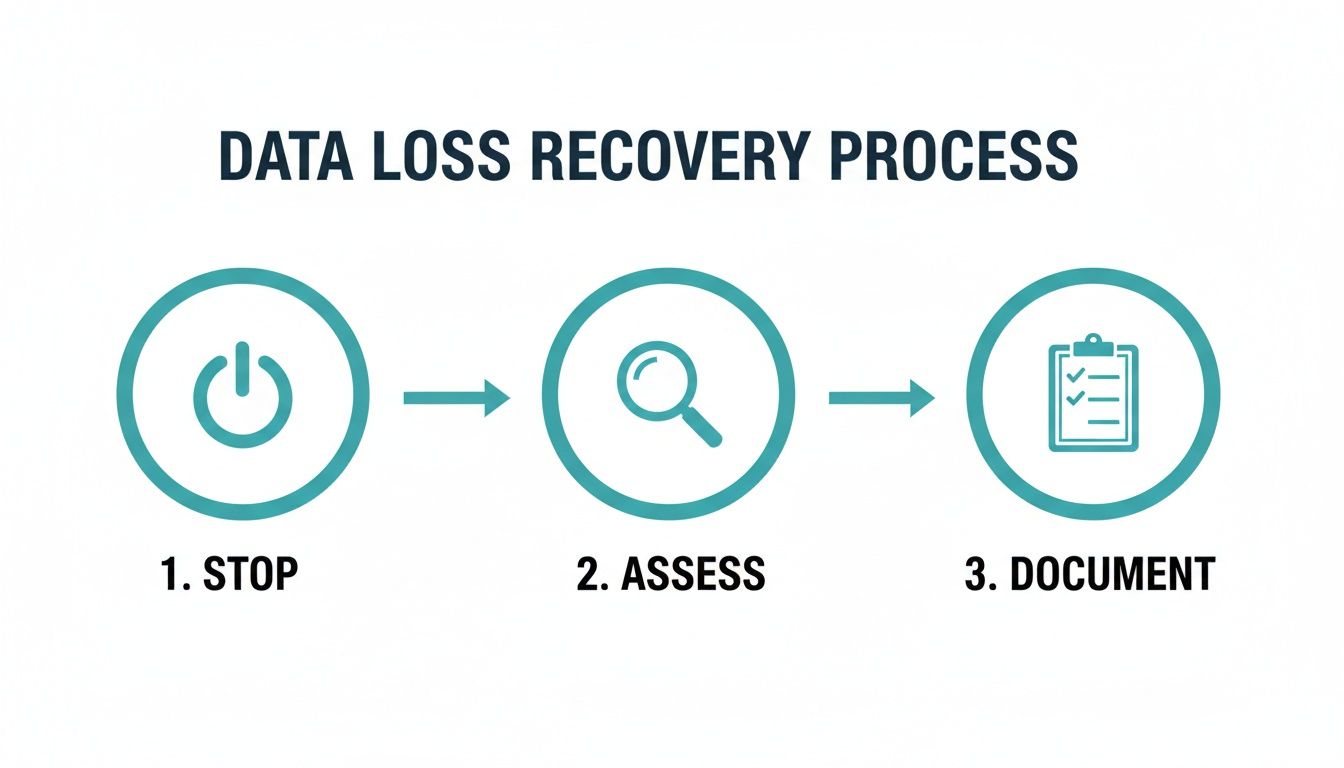
As you can see, a successful recovery starts with calm, decisive actions on your part—like immediately stopping all use of the device and taking stock of the situation.
Creating a Perfect Clone
Before any recovery is attempted, technicians do something absolutely vital: they create an exact, sector-by-sector clone of your drive. This isn’t a simple drag-and-drop file copy. It’s a bit-for-bit image created with specialised hardware that can read around damaged areas without putting more stress on the failing device.
The golden rule of data recovery is that technicians never work directly on your original drive. The clone becomes the working copy, ensuring your original media is kept safe and sound in its initial state. This prevents any possibility of making things worse during the recovery attempt.
This clone is the foundation for everything that follows. It allows the experts to work on a stable copy without risking the fragile original, which is a key principle in any solid business continuity and disaster recovery plan.
Rebuilding and Extracting Your Data
With a safe clone to work on, the real forensic work begins. Using advanced hardware and proprietary software, the technicians start analysing the drive’s structure. They can manually rebuild corrupted file systems, piece together fragmented files, and get around logical errors that would bring consumer-grade software to a screeching halt.
- For Physical Failures: This might involve swapping out internal parts like read/write heads or motors inside the cleanroom before the cloning can even begin.
- For Logical Failures: Here, technicians dive into the raw data to reconstruct the “map” that tells the operating system where your files are. In essence, they rebuild the digital roadmap back to your information.
When you’re searching for help, it’s always a good idea to understand the local market. Checking out a directory of reputable Information Technology Companies in Auckland can give you a feel for the specialists available. This methodical, painstaking process is what sets professional services apart from DIY attempts, giving you the best possible shot at getting your data back.
Professional Data Recovery vs DIY Software
When your business data disappears, the urge to download a free or cheap recovery tool can be overwhelming. It feels like a quick, common-sense fix. The reality is, it’s a high-stakes gamble that can easily turn a recoverable situation into permanent data loss, especially for Auckland businesses that depend on that information every day.
The first thing to understand is the difference between a simple file deletion and a serious drive failure. DIY software is really only designed for one specific, simple scenario: recovering a document you just deleted from a perfectly healthy, fully functional hard drive. In that case, the software is just looking for file markers that haven’t been overwritten yet. Simple.
But the moment a physical problem or a more complex logical issue is involved, these tools go from helpful to downright dangerous.

The Hidden Dangers of DIY Attempts
Running recovery software on a failing hard drive is like trying to run a marathon on a broken leg. You’re not just failing to fix the problem; you’re actively causing more severe, often irreversible, damage. If your hard drive is making clicking or grinding noises, or if it’s been dropped, it’s suffering from a physical malfunction.
Here’s what happens when you run DIY software on a physically failing drive:
- Further Mechanical Damage: The software forces the drive’s delicate read/write heads to move back and forth across the spinning platters. If those heads are already damaged, they can literally scrape the magnetic surface, physically destroying your data forever.
- Overwriting Lost Data: The very act of installing the DIY software can write new data directly over the top of the very files you’re desperately trying to save.
- Misdiagnosis: These simple tools can’t tell you if the hardware is failing. They might report a generic error, sending you down a path that only makes the real physical problem much, much worse.
For any serious Auckland data recovery situation, the risk is simply too great for any business to take. The few dollars you save on a piece of software can quickly turn into thousands of dollars in lost revenue and higher professional recovery fees—and that’s if the data is even recoverable at that point.
Comparing Your Options
Making the right call comes down to understanding the true cost, risk, and likely outcome of each path. It’s crucial to weigh up the pros and cons before you do anything.
This table breaks down the key differences between trying it yourself and calling in a professional.
DIY Recovery Software vs Professional Auckland Data Recovery Services
| Factor | DIY Software | Professional Service |
|---|---|---|
| Best For | Recently deleted files from a healthy, fully functional drive. | Physical damage, clicking drives, corrupted file systems, formatted drives, and complex failures. |
| Success Rate | Very low for anything other than simple, logical errors. | High, often over 90%, even in cases of severe physical or logical damage. |
| Risk Level | High. Can cause permanent data loss if used on a failing drive. | Very low. Experts work on a clone of your drive in a safe environment, preserving the original. |
| Tools Used | Basic software that scans for file signatures. | Specialised hardware, certified cleanrooms, and proprietary forensic tools that cost tens of thousands of dollars. |
As you can see, the approaches couldn’t be more different. One is a risky guess, the other is a calculated, safe procedure.
The fundamental difference is this: DIY software attempts recovery on a live, potentially unstable drive. A professional service first stabilises the situation by creating a perfect clone, ensuring no further damage can occur before the real recovery work even begins.
Ultimately, the choice comes down to one simple question: how much do you value your data? If it’s a file you can afford to lose forever, a DIY attempt might be a risk you’re willing to take. But for critical business information, engaging a professional Auckland data recovery service isn’t just a safer option—it’s the only responsible one.
Why Auckland Businesses Are a Prime Target for Data Loss
When you think of data loss, what comes to mind? A dropped laptop, maybe? Or an old server finally giving up the ghost? While those classic hardware failures are still very much a reality, the biggest and fastest-growing threat is coming from a completely different direction: cybercrime.
As New Zealand’s commercial heart, Auckland is a magnet for this kind of unwanted attention. Businesses across the city, from law firms in the CBD to marketing agencies in Parnell, are sitting on a treasure trove of sensitive client information. This makes them a high-value target for cybercriminals looking to steal data or, more commonly, hold it for ransom. This isn’t just a vague possibility—it’s happening every single day.
Auckland: The Epicentre of NZ Cybercrime
The stats don’t lie. Data from CERT NZ consistently shows that Auckland reports the highest number of cyber incidents in the country, and it’s not even close. This isn’t a minor headache; it’s a major financial drain on our local economy.
Auckland bore the brunt of cyber attacks with 403 reported incidents in Q4 2022, contributing to national financial losses that spiked 19% to $20 million in just one quarter. This environment hits small and medium businesses the hardest, forcing many into costly and stressful recovery efforts. You can read more about these cybercrime statistics to see the full picture.
In this climate, simply hoping your hardware doesn’t fail is no longer a viable strategy for protecting your data. The real danger is active, intelligent, and specifically targeting businesses just like yours.
Understanding this context is crucial. It means any serious Auckland data recovery plan has to account for both accidental loss and malicious attacks. A proactive defence isn’t just a good idea; it’s the only reliable way forward.
The Real Cost of Data Recovery in Auckland
Budgeting for the unexpected is just part of running a business. When a critical hard drive clicks its last or a server goes down, the first question on everyone’s mind is, “How much is this going to set us back?”
Unfortunately, when it comes to Auckland data recovery, there’s no simple, one-size-fits-all price tag. The final cost hinges entirely on what’s gone wrong and how complex the fix is.
Think of it like calling a mechanic. A blown fuse is a quick, cheap fix. A seized engine? That’s a whole different story—a major, costly repair. Data recovery is exactly the same. Pulling back a few accidentally deleted files is a world away from rebuilding a physically shattered SSD or salvaging data from a fire-damaged server.
What Determines the Final Price?
A few key things will influence the final quote from a professional recovery service. The two biggest are the type of device and the nature of the failure itself.
- Type of Device: Getting data off a standard single hard disk drive (HDD) is usually the most straightforward job. But things get trickier—and more expensive—with more complex gear like solid-state drives (SSDs), mobile phones, or multi-drive RAID servers. These require specialised tools, cleanroom environments, and a deeper level of expertise.
- Nature of the Failure: This is the big one. A logical failure, where the data is all there but the file system is corrupted, is far less expensive to fix than a physical failure. If internal parts like the read/write heads have crashed, they need to be replaced in a sterile cleanroom environment, which is a highly delicate and time-consuming process.
The hard truth is that professional data recovery in Auckland can run from a few hundred dollars for simple software issues to several thousand for complex RAID rebuilds or severe physical damage. It’s a powerful reminder that being proactive is always the more cost-effective path.
Prevention: The Most Affordable Strategy
While it’s good to know professional recovery services are there when you need them, they should always be your absolute last resort. The real “cost” of data loss isn’t just the invoice from the recovery lab. It’s the business downtime, the lost productivity, and the potential hit to your company’s reputation. It’s a reactive expense that’s always unpredictable and often painful.
Compare that to a proactive backup strategy. For a fraction of what a single major data recovery event would cost, you can get predictable, affordable protection. A solid backup plan insulates your business from hardware failure, human error, and even cyber attacks like ransomware.
It’s the difference between a potential financial disaster and a minor inconvenience.
The Best Defence? A Proactive Backup Strategy for NZ Businesses
After diving into the stressful and often expensive world of data recovery, it’s pretty clear that the best solution isn’t a cure—it’s prevention. The smartest way to handle a data disaster is to make sure it never becomes one in the first place. This means shifting your mindset from reacting to a crisis to proactively protecting your business’s most valuable asset: its information.
A robust, automated backup strategy is the ultimate safeguard for any New Zealand business. It turns the unpredictable, high-stakes cost of an Auckland data recovery emergency into a small, predictable operational expense. For a Christchurch-based company like ours, Backup NZ, providing that nationwide backup and security is exactly what we do.
Achieving True Peace of Mind
Real data resilience is about more than just saving copies of your files. It’s about building a system that works tirelessly in the background, ready to restore your operations in minutes, not days or weeks. A modern backup service neutralises the risks of hardware failure, human error, and even malicious attacks like ransomware.
This proactive approach is a non-negotiable part of any solid business plan. Good strategic planning and risk management for NZ businesses isn’t just about market share; it’s about minimising downtime and protecting your bottom line from unexpected shocks.
Key Features of a Modern Backup Solution
Our nationwide service, based here in Christchurch, New Zealand, is designed specifically for the needs of Kiwi businesses. We offer automated, secure protection with features that deliver complete confidence.
- Geographic Redundancy: We operate dual datacentres in both Auckland and Christchurch. This ensures your data is safe and recoverable even if a regional disaster strikes.
- Built-in Ransomware Detection: Our system actively monitors for the tell-tale signs of ransomware, stopping threats before they can encrypt and lock away your critical files.
- Simple Setup and Management: You can get fully protected with a straightforward setup process. This lets you focus on running your business, not managing complex IT.
A proactive backup strategy transforms data protection from a recurring worry into a solved problem. It’s the difference between a potential business-ending catastrophe and a minor, quickly resolved inconvenience.
Our transparent pricing is designed to be a small, manageable investment. We offer several tiers to fit your needs, from our Business 10 plan at $30 per month up to our Business 100 plan at $150 per month. You can learn more about our different cloud backup for business options and see how they stack up.
Simple, Transparent Pricing for NZ Businesses
We believe in straightforward pricing without hidden fees or nasty surprises.
- Business 10: $30 per month
- Business 20: $50 per month
- Business 50: $100 per month
- Business 100: $150 per month
Ready to see how easy it is to protect your business? We offer a no-obligation 14-day free trial so you can experience the security and peace of mind for yourself.
Time for a Proactive Defence? Start Your Free 14-Day Backup Trial
Waiting for a data disaster before thinking about a backup is a high-stakes gamble. For any Auckland business, that’s a bet you really can’t afford to make. The smart move isn’t scrambling to recover data after it’s gone; it’s protecting it proactively from hardware failure, human error, and the constant threat of a cyber attack.
This is where a solid, automated backup strategy becomes your best line of defence. For a small, predictable monthly cost, you sidestep the risk of a huge, unpredictable data recovery bill down the line. We’re Backup NZ, a Christchurch-based company, but we provide nationwide backup and security to Kiwi businesses. Our job is to make sure your critical data is always safe, secure, and ready to be restored at a moment’s notice.
Secure Your Business in Minutes
It’s a bit worrying how many New Zealand businesses are leaving the door wide open. Recent surveys found that a staggering 35% of small businesses across Auckland, Hamilton, and Franklin hadn’t run a backup in the last month. Even more concerning, 12% had no system in place at all. You can read more about these surprising IT statistics to get the full picture.
Our service is built to close that gap. We give you enterprise-grade protection that’s actually simple to manage.
- Automated Backups: The classic “set and forget”. We get it configured, and your data is protected continuously without you having to lift a finger.
- Dual NZ Datacentres: Your data is kept safe in secure facilities in both Auckland and Christchurch. This gives you vital protection against any regional disaster.
- Built-in Ransomware Protection: Our system doesn’t just store your data; it actively watches for and stops ransomware threats before they can lock up your files.
We keep our pricing transparent and affordable, because this kind of protection should be accessible to everyone.
- Business 10: $30 per month
- Business 20: $50 per month
- Business 50: $100 per month
- Business 100: $150 per month
Don’t wait for that gut-wrenching moment of data loss to see how important a real backup is. You can turn that nagging concern into decisive action today.
Experience what genuine peace of mind feels like with Backup NZ. Start your free, no-obligation 14-day trial and see for yourself how easy it is to secure your business’s future.