

An information security policy template is a foundational document that spells out the rules, responsibilities, and steps for protecting your business's sensitive data. Think of it as a clear, practical guide that helps your team understand how to handle information securely and what to do when things go wrong.
Why Your Kiwi Business Needs a Security Policy Now

It’s easy to write off cyber security as a headache for the big corporates, but for businesses here in New Zealand, that’s a dangerous assumption. These days, an information security policy isn't just a 'nice-to-have'—it's your first line of defence against some very real and growing threats.
Without a formal policy, your team is left guessing. They might use weak passwords, accidentally mishandle sensitive customer details, or click on a phishing email that could bring your operations to a grinding halt. A clear policy gets rid of that guesswork and builds a consistent security-first mindset across the whole business.
Protecting Against Local Threats
The threats facing Kiwi businesses are getting more specific and more frequent. Financially motivated cybercrime, in particular, is climbing. The National Cyber Security Centre (NCSC) in New Zealand dealt with nearly 6,000 cyber incident reports between July 2024 and June 2025.
In that same window, financially motivated attacks more than doubled, with direct losses of $5.7 million reported in a single quarter. A solid security policy directly addresses the kinds of vulnerabilities that lead to this sort of disruption and financial pain. You can read more about the findings on New Zealand's growing cyber threats.
This is about more than just tech jargon; it's about protecting what you've worked so hard to build. A good policy helps you:
- Protect Customer Data: It builds trust and ensures you’re meeting your obligations under the Privacy Act.
- Safeguard Your Reputation: A single data breach can do lasting damage to your brand.
- Ensure Business Continuity: A policy that includes an incident response plan means you can get back on your feet much faster after an attack.
A well-defined security policy is your organisation’s rulebook for digital safety. It translates complex security needs into simple, actionable steps everyone can follow, turning your team into your strongest security asset.
From Policy to Practical Protection
Creating a policy is a vital first step, but making it stick requires the right tools. As a Christchurch-based company providing nationwide backup and security, Backup.co.nz helps bring your policy to life. We offer the practical solutions needed to protect your data against the very threats outlined in your document.
Don’t leave your business exposed. You can start turning policy into real protection with a 14 day trial. Our plans are designed for Kiwi businesses just like yours, with pricing as follows:
- Business 10: $30 per month
- Business 20: $50 per month
- Business 50: $100 per month
- Business 100: $150 per month
Secure your data and get some peace of mind by exploring our options today.
Core Components of an Effective Security Policy

A great information security policy is much more than a list of "dos and don'ts"; it's a practical framework that guides everyone in your business. For any Kiwi organisation looking to build a robust policy, there are a few non-negotiable components you'll need to include. These work together to create a genuinely strong security posture.
First up, you need to define the purpose and scope. This section is all about clarity. It states exactly why the policy exists and who and what it covers. For instance, you should specify that the policy applies to all employees, contractors, and your company’s entire IT infrastructure — that includes cloud services and any personal devices used for work. Being explicit right from the start prevents confusion and closes security gaps that people might otherwise overlook.
Defining Roles and Responsibilities
One of the most common points of failure I see in security is ambiguity. When people don't know who's responsible for what, critical tasks get missed. Your policy has to assign roles with absolute clarity.
- Who owns the data? Make specific department heads or managers the official ‘data owners’ for the information their teams handle.
- Who manages security tasks? Define who is actually in charge of applying software patches, reviewing access logs, and managing antivirus software. Is it the IT team? A specific person?
- Who responds to incidents? Appoint a go-to person or a small, dedicated team to lead the response if a security breach ever happens.
This clarity builds accountability. When everyone knows their part, from your IT specialists to the marketing team, your organisation can react to threats in a coordinated and effective way.
Key Policy Clauses for Your Template
With the foundations sorted, it’s time to get into the specifics. The next step is to detail the rules and procedures that govern your day-to-day operations. These clauses are the real heart of your policy.
To build a comprehensive policy, there are several key sections you can't afford to skip. Each one addresses a different layer of security, creating a well-rounded defence for your business information.
Here’s a breakdown of the essentials:
Essential Sections for Your Information Security Policy
| Policy Section | Purpose and Key Details |
|---|---|
| Acceptable Use Policy (AUP) | Outlines how employees can use company assets like computers, networks, and software. It should clearly state prohibited activities (e.g., accessing illegal content, using unauthorised software) to minimise risk. |
| Data Classification | Creates clear categories for information (e.g., 'Public,' 'Internal,' 'Confidential'). This helps staff understand how to handle different types of data appropriately, ensuring sensitive information gets the protection it needs. |
| Access Control | Defines who can access what information and under which conditions. It should cover principles like multi-factor authentication (MFA) and role-based access to ensure people only see the data they need for their job. |
| Password Management | Mandates the use of complex passwords, regular changes, and the use of password managers. Good password hygiene is a simple but incredibly powerful defence against unauthorised access. |
| Incident Response Plan | Details the step-by-step process for identifying, containing, and recovering from a security incident. This ensures a calm, organised response when things go wrong. |
| Physical Security | Covers measures to protect physical assets, including servers, office equipment, and paper records. This is vital for businesses managing sensitive documents alongside digital files. |
Including these sections ensures your policy is not just a document, but a functional tool that actively protects your business from all angles.
For businesses managing extensive paperwork alongside their digital files, understanding your obligations for physical security is just as important. You can find more details on compliant document management in our guide to effective record storage in NZ.
How to Customise the Template for Your Business
A generic information security policy template is a fantastic starting point, but its real power is only unlocked when you adapt it for your specific business. The goal isn't just to have a document; it's to create a living guide that genuinely reflects how your Kiwi business operates, the data you handle, and the unique risks you face.
Think of it this way: a template is like a pre-built house frame. It’s solid, but you need to add the walls, windows, and doors that suit your needs. First up, you need to figure out what you’re protecting and what you’re protecting it from.
Start with a Simple Risk Assessment
Before changing a single word, take a moment to do a quick risk assessment. You don't need a complicated process. Just ask a few key questions to identify what truly matters to your business.
- What is your most valuable data? Is it customer payment information for your retail shop, client files for your law practice, or intellectual property for your design agency?
- Where is this data stored? Is it on a local server in your Christchurch office, in the cloud, or on employee laptops?
- What are the biggest threats? Are you more worried about an employee accidentally leaking data, a ransomware attack locking your files, or a lost device?
Answering these questions helps you focus your efforts. For example, a business that handles credit card details will need a much stricter data handling clause than one that only deals with public information. This focus ensures your policy addresses real-world scenarios, not just theoretical ones.
Your policy should be a direct response to your specific risks. By identifying what you need to protect most, you can move from a one-size-fits-all document to a tailored shield built for your organisation.
Tailor Clauses for Your Operations
Now you can get into the nitty-gritty and start modifying the template's clauses. A real estate agency with agents working on the road needs a very different remote work policy than a manufacturing business with staff primarily on-site.
Consider adjusting sections like:
- Remote Work Policy: If your team is distributed across New Zealand, your policy must have clear rules for securing home Wi-Fi networks and using company devices outside the office.
- Data Handling: A healthcare clinic must add clauses that align with the Health Information Privacy Code. A marketing agency, on the other hand, might focus more on rules around sharing client data with third-party tools.
- Acceptable Use: If your team uses specific software daily, mention it by name and outline the security expectations for its use.
This kind of customisation makes the policy relevant and practical. When your team sees their actual workflows and tools reflected in the document, they're far more likely to understand and follow the guidelines. It transforms the policy from a corporate hurdle into a helpful tool that everyone can get behind.
Building Your Incident Response Plan
When a security incident hits, a calm, organised response is your best asset. Panic isn’t a strategy. That’s why an essential part of your information security policy template must be a clear, actionable incident response plan. It details the immediate steps your team should take the moment a breach is suspected, moving from detection right through to recovery.
This isn’t about blaming people; it's about minimising damage and getting your business back on its feet as fast as possible. A solid plan ensures everyone knows their role, who to call, and what to do. It turns a potential disaster into a manageable process. This is a core part of any robust approach to business continuity. You can learn more about how this fits into a wider strategy in our guide to business continuity and disaster recovery.
Defining and Detecting an Incident
First things first: you need to decide what actually counts as a security incident for your business. Not every IT hiccup is a five-alarm fire. You need to clearly outline the types of events that trigger your response plan.
This could include things like:
- A suspected ransomware attack locking up your files.
- An employee reporting a lost or stolen company laptop.
- Strange or unusual activity detected on your network or key accounts.
- A phishing email that someone has clicked on and engaged with.
By defining these triggers, you empower your team to report issues quickly and without hesitation. You also need a clear chain of command. Your policy must state exactly who an employee should notify the moment they suspect something is wrong. This simple step avoids costly delays and ensures the right people are involved from the very start.
Aligning With National Standards
It’s smart to align your internal processes with national guidelines to make sure you're properly prepared. In New Zealand, the NCSC triaged 77 incidents of potential national harm in Q1 2025 alone. With phishing and credential harvesting jumping 15% and unauthorised access rising 11%, having a clear plan is non-negotiable.
Under New Zealand's Privacy Act, you have a legal obligation to notify the Privacy Commissioner and affected individuals of any privacy breach that has caused, or is likely to cause, serious harm. A documented incident response plan is your best evidence of due diligence.
To ensure your business is ready for anything, it’s worth delving deeper into what makes a comprehensive security incident response plan. This kind of proactive planning helps you meet your legal duties and, just as importantly, maintain customer trust.
The flowchart below shows the key steps for adapting a policy to fit your specific operational needs.
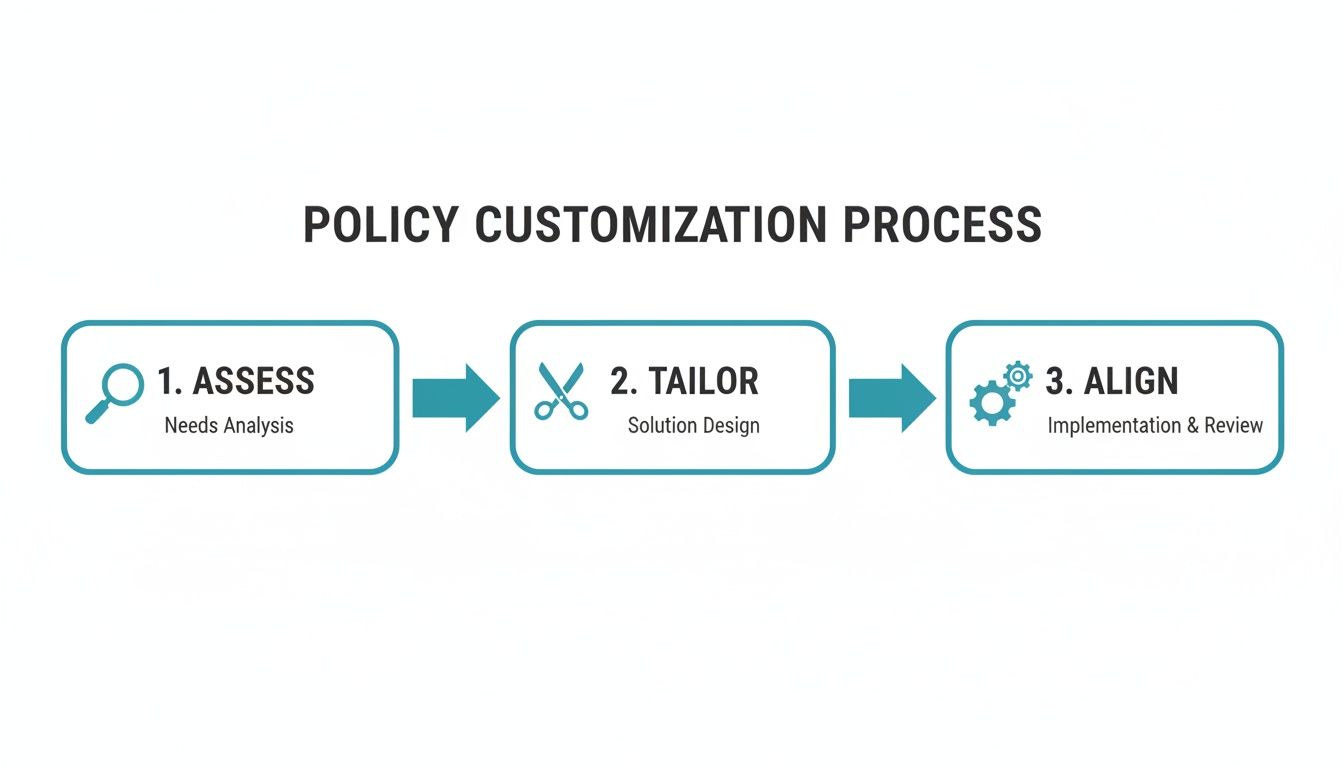
As you can see, a successful policy is built by first assessing risks, then tailoring the content, and finally aligning it with your business goals and compliance requirements.
How to Implement and Maintain Your Security Policy
Creating your information security policy is a huge step, but let's be realistic—the document itself doesn’t stop a cyber attack. The real protection comes from bringing it to life with your team and keeping it relevant.
An unimplemented policy is just a file sitting on a server. A policy that’s properly implemented and understood becomes part of your business culture.
So, where do you start? Communication is everything. Don't just email the policy out and hope for the best. You need to schedule a team meeting to walk everyone through it, explaining not just the rules, but the ‘why’ behind them. When staff understand that password rules or data handling procedures are there to protect their jobs and the business, they’re far more likely to get on board.
Fostering a Security-First Culture
Getting your team to buy-in isn't a one-off announcement; it’s an ongoing effort. This is where regular, practical training comes in. It doesn't have to be a boring, hour-long lecture either.
Think about running short, engaging workshops on spotting phishing emails, or including quick monthly security tips in your team newsletter. Investing in ongoing staff development is crucial, which might include exploring formal cyber security training. The goal is to make security a shared responsibility, not just an IT problem.
The NCSC Cyber Threat Report 2025 really drives this home, highlighting how many breaches in New Zealand stem from preventable issues like unpatched systems and password reuse. For example, they found 19 organisations running a single vulnerable system, and two of them were already compromised.
A well-implemented policy that mandates regular patching and strong password rules directly tackles these basic flaws. You can read more in this report on New Zealand's diverse cyber threats.
Keeping Your Policy Alive
A security policy should never be a "set and forget" document. Threats evolve, technology changes, and your business grows. You have to schedule regular reviews—at least once a year, or whenever there's a significant change in your operations. This could be adopting a new software system or shifting to a hybrid work model.
A security policy should be a living document. Regular reviews ensure it remains a practical tool that protects your business against current threats, rather than an outdated file gathering digital dust.
This whole process ensures your information security policy remains an effective shield. This is where a partner like Backup.co.nz can help. Based in Christchurch, we offer nationwide backup and security solutions designed for Kiwi businesses.
See how our services can support your new policy by starting a 14 day trial. With plans like Business 10 for $30 per month and Business 100 for $150 per month, we make robust protection accessible for businesses of all sizes. Secure your business today.
Turn Your Policy into Protection with Backup.co.nz
A policy on paper is a great start. But let's be honest, a document can't stop a ransomware attack. To truly protect your business, you need to back up those rules with robust, real-world tools.
That’s where we come in. We’re Backup.co.nz, a Christchurch-based company serving businesses all across New Zealand. We understand the specific challenges Kiwi businesses face, and our services are designed to bring your information security policy to life. We help automate and strengthen the very rules you’ve just worked so hard to define, from secure data backups to tight access controls.
Straightforward Plans for Kiwi Businesses
We believe powerful security shouldn't be complicated or break the bank. That’s why we offer simple, effective pricing that fits your budget and operational needs.
- Business 10: $30 per month
- Business 20: $50 per month
- Business 50: $100 per month
- Business 100: $150 per month
These plans make it easy to scale your protection as your business grows. You can dive deeper into how we protect your critical information in our guide to cloud backup for business.
Don't leave your security to chance. A policy sets the direction, but automated backups and active security measures ensure you reach your destination safely.
Don't let all your hard work creating a policy go to waste. It’s time to put it into action and see just how easy it is to protect your critical business data.
Start your free 14-day trial today and turn your policy into practical, powerful protection.
Common Questions About NZ Information Security Policies
Got a few lingering questions about putting your information security policy into action? You're not alone. Here are some of the most common queries we get, with some quick, straightforward answers to help you out.
How Often Should We Review Our Policy?
Think of your security policy as a living document, not a "set and forget" task. Best practice is to give it a full, formal review at least once a year.
But don't wait for the calendar reminder if something significant changes in your business. You should pull it out and update it anytime you adopt major new software, shift to a permanent remote or hybrid work model, or when new cyber threats emerge. The goal is to make sure it always reflects how you actually operate.
Is a Template Enough for Compliance in NZ?
A template is a fantastic starting point—it gives you a solid structure so you're not staring at a blank page. But on its own, it’s definitely not a complete compliance solution.
To meet your obligations under New Zealand's Privacy Act 2020, you absolutely must customise the template. It needs to address the specific risks your business faces and the types of personal information you handle.
Simply downloading an information security policy template and dropping your company name in is not enough. You have to actively adapt its clauses to your real-world operations and be able to show you’re actually enforcing the rules you've set.
What’s the Most Overlooked Part of a Security Policy?
Hands down, it's enforcement. It's one thing to write a great set of rules, but it’s another thing entirely to make sure people follow them.
A strong policy doesn't just list the 'don'ts'; it clearly outlines the consequences of non-compliance. This could range from simple retraining for minor slip-ups to formal disciplinary action for more serious breaches.
Without clear and consistent enforcement, even the most perfectly written policy will quickly become ineffective.
A policy creates the framework, but Backup.co.nz provides the active, automated protection. Our Christchurch-based team offers nationwide backup and security solutions that help enforce the very principles you’ve just defined. Don't leave your data's safety to chance; see how easy it is to get it sorted with a free 14-day trial.