

When it comes to law firm data security, we've moved well past the point of it being just an "IT issue." Think of it as a core business function, just as vital as client relationships or financial management. For firms in New Zealand, it's about building a fortress around your data to protect client trust, uphold your ethical duties, and frankly, ensure your practice survives.
This isn't about ticking boxes anymore. It’s about creating a proactive, robust defence against cyber threats that are getting smarter and more targeted every day.
The Growing Cyber Threat to New Zealand Law Firms

New Zealand law firms are sitting on a digital goldmine, and cybercriminals know it. Every single file you handle—from property settlements and M&A documents to sensitive litigation notes—is incredibly valuable information. It's a treasure chest that attackers are actively trying to unlock for a hefty payday.
This isn't some abstract problem happening overseas; it's right here on our doorstep. The tactics have evolved beyond generic viruses. We’re now seeing highly personalised attacks designed to trick busy lawyers and support staff into making a costly mistake. Don't think of your practice as a small firm; see it through a hacker's eyes: a vault packed with financial data, private details, and confidential strategies.
Why Your Firm is a High-Value Target
The risk is woven into the very fabric of legal work. Your day-to-day operations involve managing information that is both extremely sensitive and time-critical, which creates the perfect storm for exploitation.
Here’s why you’re in the crosshairs:
- Significant Financial Transactions: You’re managing huge sums of money through client trust accounts and property settlements. That makes your firm a direct gateway to cash.
- Confidential Client Data: You hold a huge amount of personally identifiable information (PII), which is the primary fuel for identity theft and sophisticated fraud.
- Privileged Case Information: The details of a big merger, a major acquisition, or a contentious court case can be weaponised for corporate espionage or simple extortion.
The financial damage is adding up fast across the country. In just the first quarter of this year, New Zealand's National Cyber Security Centre (NCSC) reported a staggering NZD $7.8 million in losses from cyber incidents. Tom Roberts, the NCSC's response team lead, noted that businesses were hit hardest, especially by scams that are proving incredibly effective against professional services firms like yours. You can dig deeper into these local statistics in this NZ-specific cyber incident report from SecurityBrief.
This completely reframes data security. It’s no longer a background IT task; it’s a critical business imperative. One breach can trigger devastating financial loss, shatter your firm's reputation, and land you in serious trouble for breaching your ethical and legal duties under the Privacy Act.
Let’s take a look at the specific threats that are keeping legal partners up at night.
Top Cyber Threats Facing NZ Law Firms
The cyber threats facing Kiwi law firms are varied, but a few key culprits are responsible for the most significant damage. Understanding them is the first step toward building a solid defence.
| Threat Type | Primary Risk to Law Firms | Common Example |
|---|---|---|
| Phishing & Spear Phishing | Tricking staff into revealing login credentials or authorising fraudulent payments. | An email impersonating a senior partner urgently requesting a funds transfer for a "confidential matter." |
| Ransomware | Encrypting all firm data, bringing operations to a halt until a ransom is paid. | An employee clicks a malicious link in an attachment, unleashing malware that locks every file on the network. |
| Business Email Compromise (BEC) | Intercepting communications to redirect client funds or steal sensitive information. | A hacker gains access to a lawyer's email, monitors a conveyancing deal, and sends fake payment instructions to the client at the last minute. |
| Insider Threats | A disgruntled or negligent employee intentionally or accidentally exposes sensitive data. | A departing staff member copies a client database to a personal USB drive before leaving the firm. |
These aren't hypotheticals; they are happening to firms just like yours. Protecting your digital assets is simply not optional. It demands a proactive, layered strategy that acknowledges the unique threats facing the New Zealand legal community.
The first step? Realising your firm isn't just a target—it's a premium one.
For any law firm in New Zealand, robust data security isn't just a good idea or a way to protect your reputation—it's a fundamental legal requirement. The Privacy Act 2020 lays down clear, non-negotiable rules for how you must handle the sensitive information your clients trust you with. Getting this wrong doesn’t just risk that trust; it can lead to serious financial penalties and regulatory action.
For legal professionals, this Act is the bedrock of digital ethics. It takes data protection from an abstract concept and turns it into a concrete set of duties you can't ignore. Understanding these obligations is the very first step in building a practice that is both resilient and compliant.
Understanding Privacy Principle 5
At the heart of your data security responsibilities is Privacy Principle 5: Storage and Security. This principle is refreshingly direct. It requires any agency holding personal information to ensure "reasonable security safeguards" are in place to protect it.
So, what does "reasonable" actually mean for a law firm? It’s not a one-size-fits-all definition. The standard scales with how sensitive the information is. Given that law firms handle some of the most confidential data imaginable—from financial records and health details to litigation strategies—the expectation for tough, comprehensive security is sky-high.
This principle is designed to prevent:
- Data loss from things like hardware failure or an accidental click of the delete button.
- Unauthorised access, whether it's from external hackers or even internal staff who don't have the right clearance.
- Misuse or disclosure of information for any reason other than what it was collected for.
Put simply, if you collect it, you're legally on the hook to protect it. This responsibility covers everything from digital files on your server to the physical documents in your filing cabinets. For a deeper dive into managing physical files compliantly, check out our guide on professional record storage solutions in NZ.
The Mandatory Breach Notification Scheme
One of the biggest game-changers in the Privacy Act 2020 was the introduction of the mandatory data breach notification scheme. This completely shifted the landscape, removing any grey areas about what to do when something goes wrong. You can no longer just fix a breach quietly and hope nobody notices.
If your firm experiences a privacy breach that has caused—or is likely to cause—"serious harm" to someone, you are legally required to report it. This is not optional.
A notifiable privacy breach is one that has caused or is likely to cause serious harm. This threshold forces firms to evaluate the potential impact on individuals, considering things like the sensitivity of the data, how the breach happened, and the potential for financial loss or emotional distress.
Getting your head around this process is critical. A Data Protection Impact Assessment (DPIA) is an essential tool for proactively managing privacy risks and staying compliant. For firms looking to strengthen their internal processes, Mastering Data Protection Impact Assessments (DPIA) is a valuable resource to guide you.
Steps to Take After a Breach
Once a notifiable breach happens, the clock starts ticking. Your incident response plan needs to include these non-negotiable steps:
- Notify the Office of the Privacy Commissioner: You must get in touch with the Commissioner as soon as you possibly can after discovering the breach. Any delay could lead to further penalties.
- Inform Affected Individuals: You also have a duty to notify every person affected. This communication needs to be crystal clear, explaining what happened, what information was involved, and what they can do to protect themselves.
Failing to report a notifiable breach is an offence that can attract a fine of up to $10,000. That penalty is entirely separate from any damages awarded to individuals for the harm caused. But for a law firm, the reputational damage from a poorly handled breach can be far more costly, eroding the client confidence that is the lifeblood of your entire practice.
Finding the Cracks: Where Most Law Firms Are Vulnerable
Even the most buttoned-up law firms have security blind spots that cybercriminals are masters at exploiting. Figuring out where these weak points are is the first, most critical step toward building a real defence. We're not talking about complex, Hollywood-style hacks here; usually, it's the everyday habits and overlooked basics that swing the door wide open for an attack.
Think of your firm’s security as a chain. It only takes one weak link to break the whole thing. The goal isn't to become a digital Fort Knox—that's impossible. It's about making your firm a difficult, frustrating target, so attackers give up and move on to someone easier.
The Human Element: Phishing and Social Engineering
Let’s be blunt: the single biggest vulnerability in any New Zealand law practice isn't a piece of software. It's the people using it. Attackers know that busy legal professionals are constantly multitasking and under pressure, making them prime targets for a well-disguised phishing email.
These aren't the obvious, poorly-written spam messages of the past. Today's phishing attacks are slick and incredibly convincing. They might look exactly like an email from a senior partner, a major bank, or even a government body like the IRD. They create a false sense of urgency, pressuring someone to click a bad link or authorise a payment without thinking twice.
The numbers don't lie. For Kiwi organisations, a massive 60% of reported cyber incidents come down to phishing and credential harvesting. This proves one thing: your people are the front line, and they are the primary target for anyone trying to get inside your network.
Digging deeper, recent research found that for New Zealand businesses hit by a cyber-attack, 1 in 6 had personally identifiable information (PII) stolen. For a law firm sitting on mountains of client data, that risk is off the charts. You can get a better feel for the current environment by checking out the latest NCSC cyber threat report.
Weak Passwords are an Open Invitation
Another shockingly common—and easily fixed—problem is poor password hygiene. Using simple passwords like "Password2024" or, even worse, reusing the same password across multiple systems is the digital equivalent of leaving your office key under the doormat.
Once an attacker gets their hands on one password, the first thing they do is try it everywhere else—your email, your practice management software, your cloud storage. Without a clear, firm-wide policy that insists on strong, unique passwords for every single application, you’re setting the stage for one small slip-up to become a full-blown disaster.
This is exactly why Multi-Factor Authentication (MFA) is probably the single most effective security control you can implement. It adds that vital second layer of proof, stopping an attacker cold even if they manage to steal a password.
Unsecured Networks and Personal Devices
The flexibility of modern work brings its own set of risks. Staff connecting to public Wi-Fi at a café or logging in from their personal laptop at home can unknowingly expose your firm's most sensitive information.
- Unsecured Wi-Fi: Public networks are a minefield. They're often unencrypted, which means a moderately skilled attacker sipping a latte at the next table could potentially intercept everything you send and receive.
- Bring Your Own Device (BYOD): When staff use their personal laptops or phones for work, your firm loses control over that device's security. It might be missing critical updates, lack proper antivirus software, or be shared with family members, creating a direct bridge for malware into your professional environment.
A clear BYOD policy isn't a "nice-to-have"; it's essential. It needs to spell out the minimum security standards for any personal device accessing firm data, including things like mandatory antivirus, screen locks, and giving the firm the ability to remotely wipe its data if the device is ever lost or stolen.
The Hidden Danger of Third-Party Vendors
Your firm's security perimeter doesn't end at your front door. You rely on a whole network of third-party suppliers, from your IT support company and software providers to document couriers and cloud storage services. Every single vendor with access to your systems or data is another potential doorway for an attacker.
If your accounting software provider gets breached, your financial data could be compromised. If your IT contractor has lax security, an attacker could piggyback on their credentials to waltz right into your network. It’s a huge concern, with a recent survey showing 35% of New Zealand business leaders are worried about leaks from third parties—especially since your firm remains legally responsible under the Privacy Act, even if the breach started with your supplier.
You have to vet the security of every vendor you bring on board. Ask the hard questions: What are their data security policies? Do they run regular security audits? What does their incident response plan look like? Their security is your security.
Building Your Multi-Layered Security Defence
When it comes to the relentless cyber threats facing New Zealand law firms, a proactive defence isn't just an asset—it's everything. Instead of scrambling to pick up the pieces after a breach, a multi-layered security strategy acts like a series of interlocking gates. Each layer makes it progressively harder for an attacker to reach your sensitive client data.
This approach isn't about finding one silver bullet. It’s about weaving together technical controls, smart policies, and human awareness to create a truly formidable barrier.
Think of it this way: a strong password is a good lock on your front door, but it won’t stop someone who tricks an employee into letting them in. A firewall is essential, but it can’t spot a cleverly disguised phishing email. You only build genuine resilience when you layer different kinds of protection.
This diagram breaks down the most common ways attackers try to get in, showing exactly where those defensive layers are needed most.
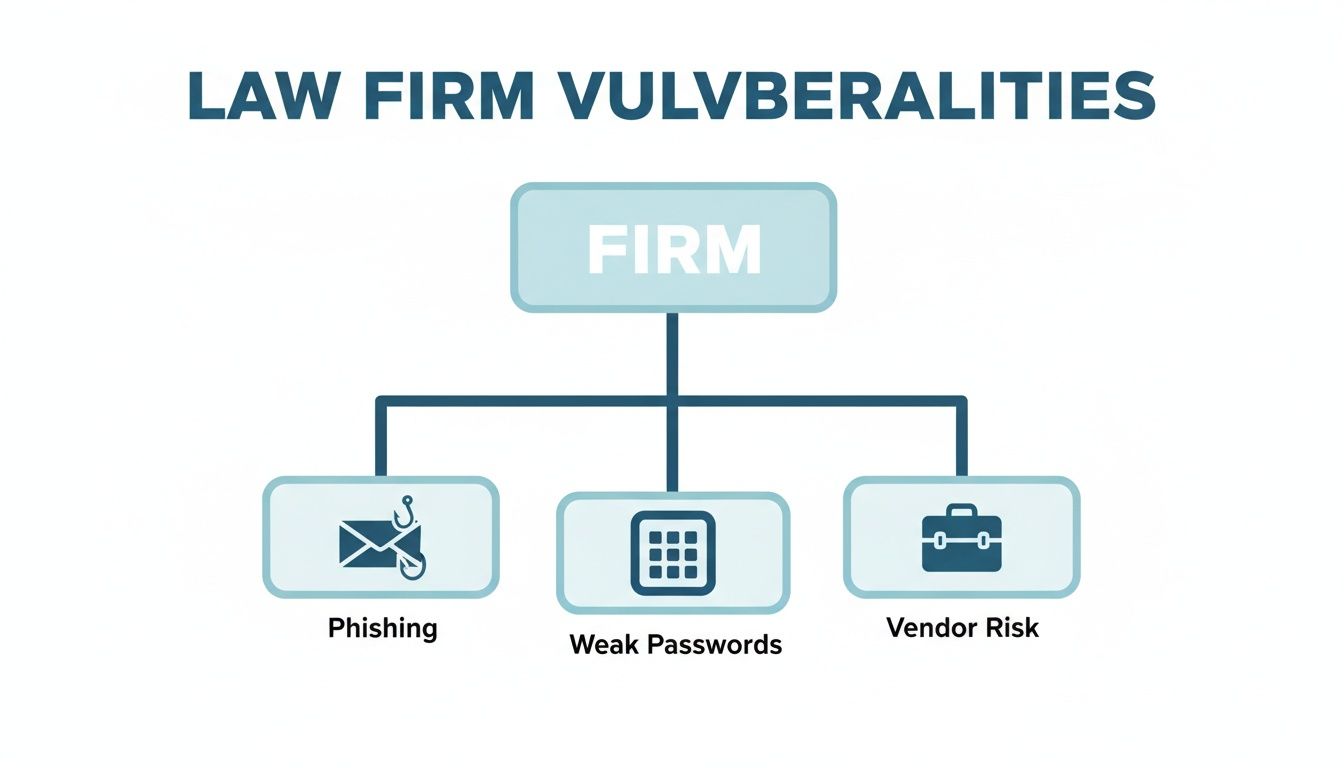
As you can see, the weak points come from all angles—human error, gaps in technology, and even trusted external partners. That’s why your defence has to cover all these bases.
Essential Technical Controls
Technical controls are the hardware and software you put in place to guard your digital fortress. They are the absolute foundation of your law firm data security, acting as the digital locks, alarms, and surveillance for your practice.
Get the basics right first, and make sure they’re rolled out across the entire firm.
- Implement Multi-Factor Authentication (MFA): This one is non-negotiable. MFA demands a second proof of identity beyond just a password, like a code sent to a mobile app. It is hands-down the most effective step you can take to shut down attacks that rely on stolen login details.
- Deploy Modern Endpoint Protection: Old-school antivirus just doesn't cut it anymore. Modern endpoint protection uses far more advanced techniques to spot and block sophisticated malware—especially ransomware—on every device connecting to your network, from laptops and desktops to mobile phones.
- Secure Your Communications: Your client conversations are privileged and immensely valuable. It's crucial to find robust and secure video conferencing solutions for law firms that offer end-to-end encryption. The same goes for your email; make sure it’s configured properly to defend against spoofing and phishing attacks.
The Cornerstone of Recovery: Secure Backups
Let's be realistic: no security system is 100% foolproof. When all else fails, your data backup is your last line of defence and your ticket to getting back on your feet. It's what allows you to recover from a ransomware attack without paying the criminals, or restore critical case files after a server dies.
But for a backup to actually work when you need it, it has to follow a proven formula.
The '3-2-1 Backup Rule' is the gold standard in data protection. It’s simple: keep three copies of your data, on two different types of media, with at least one copy stored completely offsite. This strategy builds in enough redundancy to withstand almost any disaster.
For modern firms, an automated, offsite cloud backup is the most critical part of this rule. Storing your backups in a secure, geographically separate location—like a data centre in another city—means a local disaster like a fire, flood, or an office-wide ransomware attack can't destroy both your live data and your only escape route.
Vital Administrative Controls
Technology alone isn't enough; you need strong policies and procedures to guide your team. These administrative controls define how your firm handles security on a day-to-day basis, creating a clear framework for everyone to follow. These aren't just documents to be filed away—they are living guidelines that should actively shape your firm’s culture and daily routines.
To help you get started, here is a quick checklist of the essentials every firm should have in place.
Essential Data Security Checklist for Your Firm
| Security Measure | Why It's Critical | Implementation Priority |
|---|---|---|
| Data Classification Policy | Defines what data is sensitive and requires the highest level of protection. | High |
| Acceptable Use Policy | Sets clear rules for how employees can use firm technology and data. | High |
| Incident Response Plan | A step-by-step guide on what to do during and after a security breach. | High |
| Vendor Risk Management | Ensures third-party suppliers meet your security standards before getting access. | Medium |
| Regular Access Reviews | Periodically checks who has access to what, removing unnecessary permissions. | Medium |
This checklist provides a solid starting point for building the procedural backbone of your security strategy.
Creating a Security-Aware Culture
At the end of the day, your people are one of the most critical layers in your defence. A well-trained team member can spot a phishing email a mile away, while an unaware one might accidentally open the floodgates. This is why fostering a security-conscious culture is one of the smartest investments you can make.
Regular, engaging training is the key to keeping security top-of-mind. This isn't about using scare tactics; it's about empowering your staff. When your team understands the threats and knows the right way to respond, they stop being a vulnerability and become an active part of protecting the firm. For practices looking to build this human firewall, exploring options for structured cybersecurity awareness training is a great next step.
By pulling together these technical, procedural, and human elements, you create a robust, multi-layered defence that makes your practice a much, much harder target.
The Role of Secure Backups in Business Continuity

While building strong digital defences is absolutely vital, the hard truth is that no security system is perfect. Your firm’s most valuable asset is its data, and a secure backup is the ultimate insurance policy. It's the one thing that ensures you can recover from almost any disaster, turning a potentially catastrophic event into a manageable problem.
Think of it as your firm’s digital escape plan. When a ransomware attack locks every single file, a server unexpectedly dies, or a staff member accidentally deletes a critical client folder, your secure backup is what gets you back on your feet. It's the cornerstone of your business continuity, making sure you can get back to work quickly with minimal disruption.
Neutralising the Ransomware Threat
Ransomware is a particularly nasty threat because it doesn't just steal data; it holds your entire practice hostage. The pressure to pay the criminals can be immense, especially when client deadlines are fast approaching. This is where the power of a secure, independent backup becomes crystal clear.
A recent Kordia Cyber Report highlighted a startling trend: half of all New Zealand businesses hit by a cyber-attack ended up paying the ransom. With incidents involving personal information theft and significant data loss on the rise, having an offsite backup is your most effective defence against extortion. It means you can restore your systems without funding criminal enterprises.
By having a clean, recent copy of your data stored safely away from your primary network, you remove the attacker's leverage. You can confidently refuse their demands, wipe the infected systems, and restore your information, turning a potential crisis into a recovery exercise.
For law firms, this isn't just about avoiding a payout. It’s about maintaining control and upholding your duty to protect sensitive client information. An effective backup strategy is a non-negotiable part of any robust approach to law firm data security.
Your Nationwide Solution for Secure Backups
Protecting your firm’s data shouldn’t be a complex or expensive exercise. That's where we come in. Based in Christchurch, Backup offers nationwide backup and security solutions designed specifically for New Zealand businesses. We make it simple to implement a professional-grade backup strategy that ensures your firm is protected.
Our plans are straightforward and affordable:
- Business 10: $30 per month
- Business 20: $50 per month
- Business 50: $100 per month
- Business 100: $150 per month
Effective backups are fundamental to any sound plan for business continuity and disaster recovery. The single most critical step you can take today is ensuring your data is automatically and securely protected.
Don’t wait for a disaster to highlight a gap in your defences. You can start a 14-day free trial to experience the peace of mind that comes with knowing your data is safe.
Got Questions About Your Firm's Data Security? We Have Answers.
Getting your head around data security can feel like a minefield. Below, we've tackled some of the most common questions we hear from New Zealand law firms, with straightforward answers to help you protect your practice.
Our Firm Is Small. Are We Really a Target for Cyber Attacks?
Yes, absolutely. It's a dangerous myth that cybercriminals only chase the big fish. In reality, attackers often view smaller practices as easier targets, banking on the assumption you have fewer security measures in place.
Cybercriminals aren’t hand-picking their victims one by one; they use automated tools that constantly scan the internet for any weakness, regardless of a business's size. It’s not your firm's headcount they’re after, it's the goldmine of data you hold—client funds, personal details, and sensitive case information. New Zealand's own NCSC confirms that attacks hit businesses of all sizes, making robust law firm data security a non-negotiable cost of doing business, not some luxury for the big players.
What Is the Single Most Effective Security Measure We Can Implement?
If you do only one thing to upgrade your security this year, make it Multi-Factor Authentication (MFA). Roll it out across every critical system you have, especially your email accounts and practice management software.
The NCSC consistently flags MFA as a game-changer because it shuts down the vast majority of attacks that hinge on stolen passwords. Even if a criminal tricks a staff member into giving up their password with a clever phishing email, they still can't get in. They're stopped in their tracks because they don't have that second piece of the puzzle, like a code from a mobile app. It’s a simple, low-cost move that delivers a massive security payoff.
Think of MFA as adding a deadbolt to your digital front door. A stolen key (your password) is useless on its own. The thief still needs that second, unique verification that only you have.
How Do We Know if Our Data Backup Solution Is Actually Effective?
A backup you can count on has three key ingredients: it’s automated, it’s secure, and it's regularly tested. After all, a backup is completely worthless if it fails the one time you desperately need it.
First, your backups must run automatically every single day, no questions asked. Relying on a human to remember is a recipe for disaster. Second, those backups need to be encrypted—both while they’re being transferred and while they're stored. This stops anyone from snooping on your data.
Most importantly, your backups must be kept offsite, completely separate from your main network. This is the crucial step. It ensures that a ransomware attack or a real-world disaster like a fire can't wipe out both your live data and your only way to recover. And finally, you have to test your restores regularly. An untested backup isn't a plan; it's a prayer.
We Use Cloud Software. Isn’t Our Data Already Secure?
This is a big one. While top-tier cloud providers like Microsoft and Google do a fantastic job of securing their own infrastructure, security is always a two-way street. They protect their platform, but you are responsible for securing your firm’s access to that platform.
That means it’s still on you to enforce strong, unique passwords and MFA for all your user accounts. It’s on you to manage who has permission to access sensitive files. And it’s on you to protect your own devices from malware that could steal your cloud logins. You're also still exposed to internal threats, like a staff member accidentally—or intentionally—deleting critical files.
Having an independent backup of your cloud data is the ultimate safety net. It gives you 100% control over your firm's most vital information, completely separate from your software provider. It guarantees you can always get your data back, no matter what happens.
For New Zealand law firms looking for a reliable, automated, and secure backup solution, Backup offers nationwide protection from our base in Christchurch. Our straightforward plans are designed to give you complete peace of mind.
- Business 10: $30 per month
- Business 20: $50 per month
- Business 50: $100 per month
- Business 100: $150 per month
Don't leave your firm's most valuable asset unprotected. Secure your data and ensure you can get back to business quickly by starting a no-obligation 14-day free trial today.