

A solid small business data backup plan is your single best defence against data loss. It’s what turns a potential catastrophe into a minor, manageable hiccup. At its core, it’s about creating secure, accessible copies of your critical business information so you can get back on your feet quickly after a hardware failure, cyberattack, or even simple human error.
Why Your Business Needs More Than Just Hope

Running a small business in New Zealand means wearing a lot of hats. It's so easy to let something like data backup slide down the to-do list. I’ve seen it time and again: business owners just hope for the best—hoping a hard drive won’t crash, an employee won’t click on a dodgy link, or a burst pipe won't flood the office. But hope isn’t a strategy.
In New Zealand's bustling small business scene, with over 617,330 enterprises as of February 2025, robust data backups have become a non-negotiable defence. Cyber threats are skyrocketing, and the National Cyber Security Centre (NCSC) logged a staggering 7,122 cybersecurity incidents in the year ending June 30, 2024. Many of these attacks hammered the small and medium businesses that are the backbone of the Kiwi economy. Without solid backups, these businesses are just sitting ducks.
The Real Costs of Data Loss
The consequences of losing your data go way beyond a few missing files. For a Kiwi SME, the impact can be genuinely devastating.
- Financial Drain: Downtime costs real money. Every hour your systems are offline means lost sales, unproductive staff, and recovery costs that can spiral out of control fast.
- Reputational Damage: Losing client information or failing to deliver your services erodes trust. In a small market like New Zealand's, a damaged reputation is incredibly hard to repair. Word gets around.
- Legal Obligations: Under New Zealand's Privacy Act 2020, you have a legal duty to protect personal information. A data breach from inadequate protection can lead to hefty fines and a whole lot of regulatory headaches.
Getting your head around the modern threat landscape, including effective strategies to protect against ransomware, really drives home why a backup plan is so crucial.
A well-crafted data backup plan is more than just an IT task; it's a core part of your overall business continuity strategy. It ensures that when things go wrong, you have a clear, tested path back to business as usual.
Ultimately, a proactive small business data backup plan is one of the most powerful tools you have. We explore this in more detail in our guide on business continuity and disaster recovery. It’s what transforms a potential crisis into a manageable, planned-for event.
Identifying Your Most Critical Business Data
Before you can build a solid small business data backup plan, you have to know exactly what you’re protecting. It’s a bit like doing a stocktake, but for your digital assets. This isn’t some technical task just for the IT crowd; it's a core business exercise that forces you to identify what actually keeps your operation running day-to-day.
The first move is to pinpoint your 'crown jewels'—the data your business absolutely cannot function without. For most Kiwi businesses, this is simpler than it sounds. It’s the information you rely on every single day to get work done, serve your customers, and meet your obligations.
What Data Should You Prioritise?
Start by making a straight-up list. Just ask yourself: if this file or folder vanished tomorrow, would we grind to a halt?
- Financial Records: This is everything from your Xero or MYOB files to invoices, payroll details, and tax documents. Losing this stuff is a guaranteed headache with the IRD and can bring your cash flow to a standstill.
- Client and Customer Databases: This is the lifeblood of your business. Your customer list, their contact info, sales history, and any project communications are invaluable for maintaining relationships and driving future sales.
- Operational Files: Think about all the documents that make your business tick. Supplier contracts, project plans, intellectual property, and your internal process guides all fall into this bucket.
- Legal and HR Records: This covers sensitive information like employee contracts, health and safety documentation, and other compliance-related files. Managing these records properly isn't just good practice—it's a legal requirement. Our overview of secure record storage in NZ has more helpful insights on this.
Once you know what to protect, you need to figure out where it all is. It’s rarely in one neat place. Data is often scattered across a server in your Christchurch office, employee laptops in Auckland, and cloud apps like Microsoft 365. Mapping it all out ensures nothing critical gets missed.
Understanding Your Recovery Goals
With your data audit done, you can start setting some clear recovery goals. They might sound technical, but they’re actually simple concepts that are vital for choosing the right backup strategy.
Recovery Time Objective (RTO): How quickly do you need to be back up and running after a disaster? Can your business handle being down for a full day, a few hours, or just a matter of minutes?
Recovery Point Objective (RPO): How much data can you realistically afford to lose? This is all about timing. An RPO of 24 hours means you’re okay with losing up to a day’s worth of work. For a busy online store, that would be a disaster; an RPO of 15 minutes might be more realistic.
Defining your RTO and RPO is what takes you from a vague idea of "needing backups" to a sharp, actionable plan that fits your business perfectly. It’s how you make sure your investment in a backup solution actually delivers the specific protection you need when things go wrong.
Choosing the Right Backup Strategy for Your Business
Once you've mapped out what data is critical, the next step is picking the right tools to build a solid small business data backup plan. This part can feel a bit daunting, but for Kiwi business owners, it really comes down to a few core ideas that will keep you safe, no matter what gets thrown your way.
The first big decision is between local and cloud backups. A local backup is exactly what it sounds like: a copy of your data on a physical device in your office, like an external hard drive. It's fantastic for getting a file back quickly, but it’s completely exposed to local disasters like a fire, flood, or even theft.
Just imagine your Wellington design agency's server gets damaged in a minor earthquake. If your only backup is a hard drive sitting right next to it, you’ve just lost everything.
The Power of Off-Site and Cloud Backups
This is precisely where secure cloud backups become a non-negotiable part of the plan. A cloud backup service stores an encrypted copy of your data in a secure, off-site data centre. If a freak weather event makes your Queenstown tourism office inaccessible, all your booking data and financial records are still safe and sound, ready to be recovered from anywhere with an internet connection.
You can learn more about the advantages of professional cloud backup for your business and see how it shields you from these kinds of local disasters.
For most businesses I talk to, the best approach isn't an "either/or" choice. It’s a hybrid model that blends the speed of local backups with the robust security of the cloud. This strategy is the heart of a globally recognised best practice called the 3-2-1 Rule.
The 3-2-1 Rule is simple but incredibly effective: maintain three copies of your important data, on two different types of storage media, with at least one of those copies located safely off-site.
This is the gold standard recommended by cybersecurity authorities like CERT NZ. It's smartly designed to make sure no single point of failure can ever wipe out your data. For example, you could have your main data on your office server, a second copy on a local Network Attached Storage (NAS) device, and a third, encrypted copy securely tucked away in the cloud.
Making the 3-2-1 Rule Effortless
Trying to manually juggle three copies of everything is a real headache, and that’s where a managed service becomes invaluable. Our nationwide service, based right here in Christchurch, New Zealand, automates the entire 3-2-1 process. We make sure your data is always backed up following this rule, without you ever having to lift a finger.
It’s shocking how many New Zealand businesses are still flying blind. While global stats show 35% of small businesses don't back up regularly, Kiwi firms face the same risks. This is amplified by the fact that cyberattacks are hitting SMEs every 12 minutes in 2024. The ones with a proper plan? They recover 80% faster.
On top of that, the Privacy Act 2020 has strict rules about protecting data, yet many businesses are lagging. It's worth taking a look at the New Zealand digital economy and its challenges to get a clearer picture of the landscape.
We’ve made professional-grade protection accessible with our affordable plans:
- Business 10: $30 per month
- Business 20: $50 per month
- Business 50: $100 per month
- Business 100: $150 per month
Don't leave your business exposed to chance. You can start a no-obligation 14-day trial today and see just how easily you can implement a truly bulletproof backup strategy.
Putting Your Backup Plan into Action
A solid strategy is a great start, but it's the execution that truly protects your business. This is where your small business data backup plan moves from a document on your desk to a real, working process. The key here is automation—you want to create a system that works tirelessly in the background, removing the risk of human error and the all-too-common "I'll get to it tomorrow" mindset.
Automating your backups means they happen like clockwork, without you needing to lift a finger or interrupt your day. It’s about deciding on a schedule and the type of backup that makes sense for your business, and then letting the technology handle the rest.
Scheduling Your Backups
How often should you run your backups? That really comes down to your Recovery Point Objective (RPO), which is a fancy way of asking: "how much data can we afford to lose without it causing a major headache?"
- Daily Backups: For most small businesses, an automated daily backup is the perfect starting point. It’s a sensible baseline that ensures, at worst, you’d only lose a single day's worth of work.
- Intra-day Backups: If your business is constantly processing transactions—think an e-commerce store or a busy accounting firm—you'll want to be backing up much more frequently. Running backups every few hours, or even more often, can be critical to minimise data loss.
The most important thing is to set a schedule and have it run automatically. This is a core part of any good managed service; we take that entire burden off your shoulders.
A backup plan isn’t a one-time setup; it’s an ongoing, automated process. The best plans are the ones you don’t have to think about because they are consistently working to protect you.
For the nearly 617,330 small businesses operating in New Zealand as of February 2025, a reliable backup plan is non-negotiable. Cyber risks are climbing, with over 7,122 incidents reported by the NCSC through June 2024 alone. Automation is your first line of defence. If you're interested in the numbers, you can find out more about New Zealand business demography statistics from Stats NZ.
Choosing Your Backup Type
There are three main ways to back up your data, each with its own pros and cons.
- Full Backup: This is exactly what it sounds like—a complete copy of everything you've selected. It’s the simplest to understand but takes the longest to run and eats up the most storage space.
- Incremental Backup: After you’ve done one full backup, this method only copies the bits of data that have changed since the last backup was performed. It's quick and uses very little storage, but restoring your files can be a bit more complex.
- Differential Backup: This one is a bit of a hybrid. It copies all the data that has changed since the last full backup. It uses more space than an incremental backup, but it makes the restore process much faster and simpler.
This infographic neatly illustrates the 3-2-1 rule, which is a foundational concept for any bulletproof backup strategy.
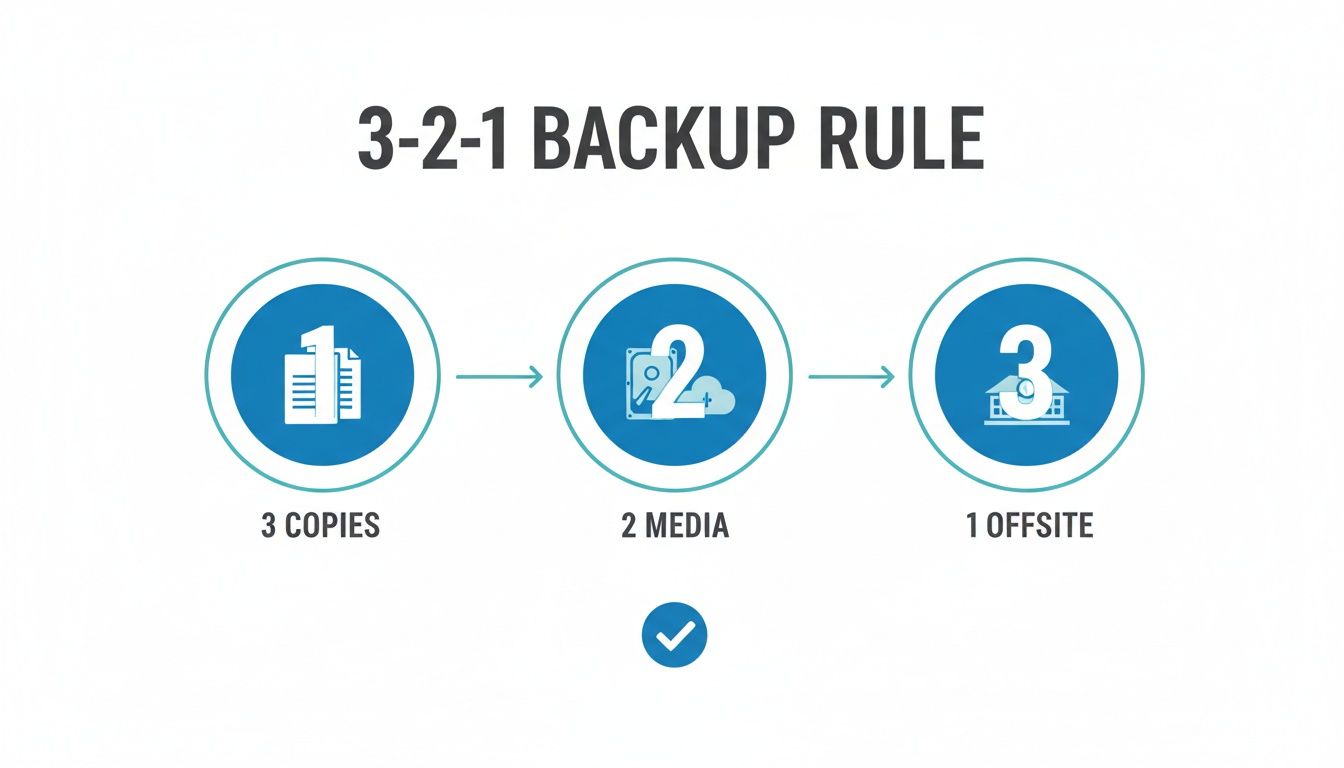
By keeping three copies of your data on two different types of media, with one of them stored off-site, you build in redundancy. It means a single point of failure won't take your whole business down.
Our managed backup plans, based right here in Christchurch and serving businesses nationwide, are designed to handle all of this for you. Starting from just $30 per month, we put a smart hybrid strategy in place that makes sure your critical data is automatically protected by a dedicated New Zealand team.
Our Managed Backup Plans:
- Business 10: $30 per month
- Business 20: $50 per month
- Business 50: $100 per month
- Business 100: $150 per month
If you want to experience this peace of mind for yourself, you can start a free 14-day trial and see just how simple and effective automated protection can be.
Testing Your Plan and Preparing for Recovery
Let's be blunt: an untested backup is nothing more than a gamble. It’s a hope, not a strategy. And in business, you simply can't afford to take that kind of risk with your critical data.
This final step is about proving your small business data backup plan actually works, long before you’re in the middle of a crisis. Think of it as a fire drill for your data. You practise the process when things are calm so you know exactly what to do when a real emergency hits.
Regularly performing test restores is completely non-negotiable. This doesn't need to be a massive, disruptive exercise. Even just recovering a single file or a folder is enough to confirm that your backups are running correctly and that the data itself is viable. This simple act builds huge confidence and helps you iron out any kinks in your process before they can blow up into a genuine disaster.
Running a Simple Restore Test
A good test should be straightforward and something you can do regularly—maybe once a quarter. The goal is to verify that you can actually get your data back when you need it.
Here’s a simple way to approach it:
- Pick a non-critical file or folder: Choose something that won't disrupt daily operations if it takes a few minutes, like an old marketing document or a completed project folder.
- Restore it to a different location: This is key. Don't overwrite the original. Instead, restore the backup to a new folder, maybe on your desktop, so you can easily compare it with the live version.
- Check the data: Open the restored file. Is it complete? Is it corrupted? Is it the version you expected? Give it a proper look.
- Document everything: Quickly jot down the steps you took, how long it took, and any snags you hit along the way. This documentation becomes your own personal recovery guide.
At the end of the day, a backup plan is only as good as its ability to restore your data. If you want to dive deeper into the recovery side of things, check out this practical guide on how to recover deleted files.
An untested backup is not a backup at all; it's just a hopeful assumption. Regular testing turns that assumption into a proven, reliable safety net for your business.
Don't wait for a real emergency to find out if your plan holds water. We invite you to put our service to the test and see just how simple restoring your data can be. With our Christchurch-based team providing nationwide support, you can get the peace of mind that comes from knowing your recovery plan is solid.
Prove your plan works today. Start a completely free 14-day trial and perform a test restore for yourself.
Your Small Business Backup Questions, Answered
We talk to Kiwi business owners all the time about getting a reliable small business data backup plan in place. It's a common source of confusion, so let's clear up some of the most frequent questions we hear.
How Often Should I Back Up My Business Data?
For most small businesses here in New Zealand, setting up an automated daily backup is the perfect place to start. In technical terms, this gives you a sensible Recovery Point Objective (RPO), which is just a fancy way of saying you’d never lose more than a day's worth of work if disaster struck.
But what if your business is all about high-volume transactions? Think of a busy retail store in Christchurch or an e-commerce site shipping nationwide. In those cases, waiting a full day is too risky. You'll want to back up far more frequently—maybe every few hours—to keep that potential data loss to an absolute minimum.
The most important thing, though, is that the process is completely automated. A 'set-and-forget' system is non-negotiable because it guarantees your backups happen consistently, without you ever having to remember to do it.
What Is the Difference Between Cloud and Local Backup?
Let's break it down simply. A local backup is a copy of your data stored on a device you can physically touch—like an external hard drive sitting in your office. It's fantastic for getting your files back quickly, but it shares the same risks as your computers. It’s vulnerable to theft, fire, or a flood. A serious local event could wipe out both your live data and your only backup in one go.
A cloud backup is different. It sends an encrypted copy of your data to a secure, off-site data centre, like the ones we use right here in New Zealand. This is what protects you from any disaster that could impact your physical premises.
The gold standard is a hybrid approach that uses both, which is the core of the industry's 3-2-1 rule. Our service is designed to be that crucial, secure off-site copy, giving you a complete, robust strategy.
Do I Need a Backup if I Use Microsoft 365 or Xero?
Yes, you absolutely do. This is probably the single most dangerous misunderstanding we see among business owners.
Cloud giants like Microsoft 365 and Xero have incredible systems to protect their own infrastructure. If their servers fail, they have you covered. But their responsibility typically ends there. They don't protect you from data loss that happens on your end.
We're talking about very common, everyday scenarios like:
- An employee accidentally deleting a critical folder.
- A disgruntled ex-staff member maliciously wiping data.
- A ransomware attack that locks up all your files and demands payment.
A dedicated third-party backup service gives you an independent, unchangeable copy of your data that you own and control. It’s your ultimate safety net, ensuring you can always restore your information, no matter what happens inside the app itself. Think of it as an essential layer of security for any modern business.
Ready to secure your business with a professional backup plan? Backup offers nationwide backup and security from our base in Christchurch, New Zealand. Our automated service ensures your critical data is always protected.
Start your free, no-obligation 14-day trial today and see how easy peace of mind can be.