
When you hear the term “storage space cost”, it’s easy to think of a simple monthly fee. But the true price of storing your business data, especially for New Zealand businesses where data is everything, is a lot more complex than a few dollars per gigabyte.
The Real Price of Business Data Storage
Thinking about your data storage bill is like looking at the sticker price of a new ute. That price gets you in the door, but it barely scratches the surface of what it actually costs to own and run it. The real price tag includes all the ongoing expenses needed to keep that vehicle—or in this case, your data—safe, accessible, and ready to go when you are.
For Kiwi SMBs, particularly those in professional services like law firms or accounting practices, data isn’t just a side effect of doing business; it’s the core of what you do. Client files, financial records, and intellectual property are your most valuable assets, but they also carry a huge amount of risk if they’re not managed properly. Getting your head around the complete financial picture of data storage is fundamental to your business’s health.

Uncovering the Hidden Expenses
The true storage space cost is a mix of various direct and indirect expenses. Once you look past the baseline subscription, you need to factor in:
- Maintenance and Management: The time and expertise it takes to manage, update, and secure your storage systems.
- Security and Compliance: The cost of implementing proper security like encryption and making sure you’re compliant with New Zealand’s Privacy Act.
- Energy Consumption: The power required to run and cool physical servers, a cost that’s only going up.
- Potential Downtime: The massive cost of lost productivity and revenue if you can’t get to your data when you need it most.
A truly effective storage strategy isn’t about finding the cheapest option; it’s about finding the best value. This means balancing upfront costs with long-term security, reliability, and peace of mind.
Here at Backup NZ, a Christchurch-based company providing nationwide backup and security, we believe in transparent pricing that covers all these critical areas from the start. Our plans like Business 10 ($30/month) and Business 20 ($50/month) are designed to give you comprehensive protection without the nasty surprise of hidden fees.
You can see this clarity for yourself with a no-obligation, 14-day free trial and discover just how simple managing your costs can be.
Understanding Common Data Storage Pricing Models
Trying to make sense of data storage pricing can feel a bit like comparing quotes from different builders—everyone seems to have their own way of charging. For Kiwi businesses, getting your head around the common models is the first step to making a smart decision on your storage space cost.
The most straightforward and flexible option you’ll come across is Pay-As-You-Go (PAYG) pricing. Think of it like your power bill: you only get charged for the exact amount of storage you actually use each month. This model is a godsend for businesses with unpredictable data growth, like a marketing agency juggling different client projects, because it scales up and down right alongside your needs.
Tiered vs Per-User Models
Then you have Tiered Pricing. This is more like buying a pre-paid data plan for your mobile. You purchase storage in fixed blocks—say, 1TB or 5TB—for a flat monthly fee. It makes budgeting nice and predictable, but there’s a catch. If you only use 600GB of a 1TB plan, you’re still paying for the whole terabyte. This approach works best for businesses with stable, well-understood data needs. For a detailed look at how the big providers structure these costs, you can check out guides like this one on Azure Blob Storage pricing.
Another popular method is the Per-User model. You’ll often see this with Software-as-a-Service (SaaS) platforms. The model charges a simple flat fee for every person in your organisation who needs access. Billing is wonderfully simple, but it can get pricey as your team grows, no matter how much (or how little) data each person actually stores.
The right pricing model isn’t just about finding the lowest number. It’s about matching the cost structure to how your business actually operates—how you grow, how you work, and how you access your critical information.
Finally, there’s the more specialised Per-Workload model. This one is tailored to specific applications, like a big database or a virtual server. The cost is calculated based on the precise resources that particular workload consumes. It’s a bit more complex, but it offers incredibly granular control for businesses with heavy-duty tech operations.
Picking the right one is a crucial part of building a solid cloud backup for business strategy that protects your data without blowing the budget. Get it wrong, and you could end up either paying for a heap of storage you don’t use or getting stung with surprise bills when your needs change.
To help you see how they stack up, here’s a quick comparison of the main models.
Storage Pricing Models at a Glance
This table breaks down the four common models to help you figure out which one might be the best fit for your business.
| Pricing Model | Best For | Pros | Cons |
|---|---|---|---|
| Pay-As-You-Go | Businesses with fluctuating or unpredictable data growth. | Highly flexible, cost-efficient (only pay for what you use). | Can be hard to budget for as costs vary month-to-month. |
| Tiered | Businesses with stable, predictable storage needs. | Predictable monthly costs, simple to understand. | You might pay for unused capacity if you don’t hit the tier limit. |
| Per-User | SaaS-heavy businesses or companies that prefer simple, headcount-based billing. | Easy to manage and forecast costs based on team size. | Can become expensive as the team grows, regardless of storage use. |
| Per-Workload | Tech-heavy businesses with specific, resource-intensive applications. | Granular cost control aligned with specific application needs. | More complex to manage and calculate than other models. |
As you can see, there’s no single “best” option—it all comes down to finding the model that aligns with your specific operational needs and growth plans.
What Drives Your Storage Space Cost Up
Ever wondered why two Kiwi businesses with the same amount of data can end up with wildly different storage bills? It’s a common puzzle. The answer is that your total storage cost isn’t just about the gigabytes you consume; it’s shaped by a handful of operational decisions and hidden factors that can make your monthly invoice balloon.
Getting a handle on these drivers is the first step to controlling your budget.
One of the biggest culprits is data redundancy—in simple terms, how many copies of your data you keep. Having multiple copies is absolutely vital for disaster recovery, but storing three or four identical versions of every file will triple or quadruple your storage footprint, and your costs right along with it. This is often linked to your retention policies, or how long you’re required to keep data. A law firm that must hold onto client files for seven years will naturally face a bigger storage bill than a retailer who can archive old sales data after just one.
The Overlooked Costs of Security and Access
Next up are the layers of security you need. Encryption, the process of scrambling data to make it unreadable without a key, is non-negotiable for protecting sensitive information. But it’s worth knowing that more advanced encryption can demand a bit more processing power and slightly more storage space, adding to your overheads.
The most surprising expense for many, though, is egress fees. Think of your cloud storage as a secure warehouse. It might be cheap to put your boxes inside, but the provider charges you every single time you want to take a box out.
Egress fees are the charges for accessing, retrieving, or moving your data out of a cloud service. Frequent data access, large file restores, or switching providers can lead to significant, unexpected bills that aren’t always advertised upfront.
This is a growing concern. The New Zealand data centre storage sector, currently valued at USD 203 million, is forecast to hit USD 472 million by 2032. This explosion, driven by cloud computing and AI, pushes up infrastructure costs for SMBs, with energy bills alone spiking by 20-30% each year. You can learn more about the New Zealand data centre market growth and see how it impacts your bottom line.
This simple decision tree can help you visualise which pricing model might fit your business growth.
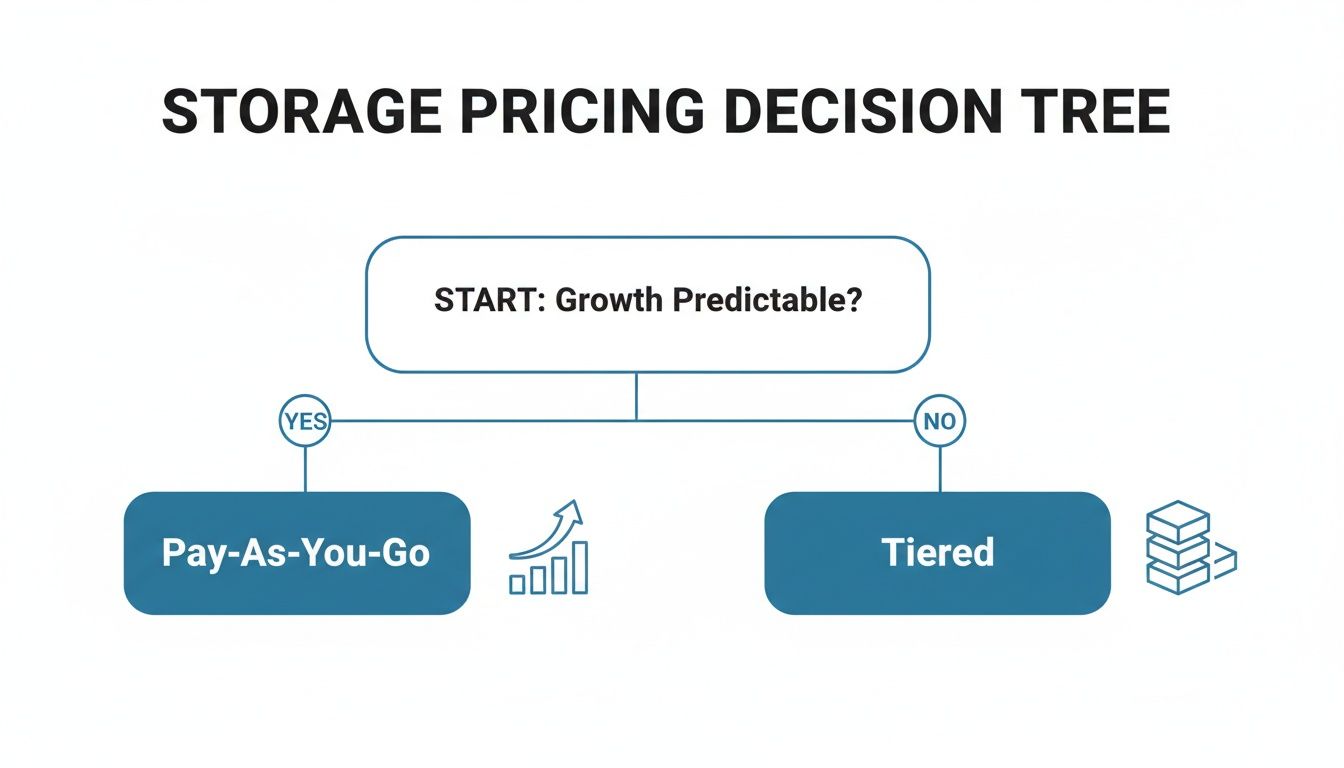
The key is to match your payment model to your real-world operations to avoid paying for capacity you don’t need.
How Recovery Needs and Data Type Affect Price
Finally, your recovery goals have a huge say in the final price. Your Recovery Time Objective (RTO)—how quickly you need to be back online after a disaster—and your Recovery Point Objective (RPO)—how much data you can afford to lose—directly influence costs. A near-zero RTO and RPO requires high-performance, instantly available storage, which is always the most expensive option.
On a similar note, not all data is created equal. The files you access every day are kept in “hot” storage, which is fast but pricey. Data you rarely touch can be shifted to “cold” storage, which is much, much cheaper but slower to retrieve from. Misclassifying your data and keeping everything in hot storage is one of the easiest ways to unknowingly send your storage costs through the roof.
Key Storage Considerations for Kiwi Businesses
When it comes to your data, where it lives really matters. For Kiwi businesses, the decision isn’t just about picking a provider with enough gigabytes. It’s about navigating New Zealand’s unique operational and legal landscape, and choosing a partner who gets it. This isn’t just a nice-to-have—it’s a critical part of managing both your risk and your storage space cost.
Storing your data right here in Aotearoa, in local datacentres like those in Auckland or Christchurch, brings some immediate, practical advantages. The most obvious one is lower latency. Because your data has less physical distance to travel, backups and—more importantly—restores are significantly faster. When you’re in the middle of a disaster recovery, those saved minutes can be the difference between a minor hiccup and a major financial hit.
Data Sovereignty and Compliance in Aotearoa
Beyond pure speed, there’s the crucial idea of data sovereignty—keeping your data under New Zealand’s legal jurisdiction. This is a strategic necessity for any business handling sensitive information, and for professional services, the rules are even stricter.
Compliance with New Zealand’s Privacy Act is non-negotiable. For industries like law and accounting, specific regulations dictate how client data must be stored, managed, and retained. This makes a local provider who understands these obligations essential.
Getting this wrong can lead to serious penalties and lasting reputational damage. An expert local provider is invaluable here, making sure your setup is compliant from day one. In fact, managing these obligations properly is a core part of your overall record storage NZ strategy.
The Growing Cost of Onshore Infrastructure
Choosing a local provider also helps you navigate the rising costs of physical infrastructure. New Zealand’s data centre market is booming, currently valued at around $200 million, and the price of physical storage is climbing with it. Projections show an annual growth of 13.15% through to 2033.
For businesses in hubs like Auckland and Wellington, the expense of maintaining compliant data retention can escalate quickly, especially with the shift to premium, high-performance tech. You can find out more about the New Zealand data centre storage market trends and see how they’re impacting business costs.
Actionable Strategies to Optimise Your Storage Costs
It’s one thing to understand the theory behind storage space costs, but it’s another thing entirely to put that knowledge into practice and actually lower your monthly bill. For Kiwi businesses, actively managing your data footprint isn’t just good housekeeping—it’s a critical financial strategy.
The good news is that a few simple, proactive steps can lead to significant savings, all without compromising the security or accessibility of your crucial files. This isn’t just about randomly deleting old documents. It’s about building intelligent processes that ensure you only pay for the storage you genuinely need and use.
Smart Data Management Techniques
Often, the most effective way to cut costs is simply to reduce the amount of data you’re storing in the first place. Two incredibly powerful, and often automated, techniques for this are data compression and deduplication. Compression works by shrinking individual file sizes, while deduplication cleverly identifies duplicate copies of data across your entire system and stores only a single instance.
Think of it like packing a suitcase. Compression is like using vacuum-seal bags to shrink your clothes down. Deduplication is realising you packed three identical shirts and deciding to take only one.
Here are a few other powerful strategies you can implement right away:
- Archive Old Data: Not all data needs to be at your fingertips. Get into the habit of moving older, infrequently accessed files to cheaper “cold” storage tiers. This keeps them safe for compliance purposes but gets them off your expensive, high-performance “hot” storage.
- Conduct Regular Audits: Set a reminder to do a quarterly or bi-annual review of your stored files. This is the perfect time to identify and eliminate redundant, obsolete, or trivial (ROT) data that’s needlessly inflating your storage bill.
- Establish Clear Policies: Create a straightforward data retention policy for your team. This simple document ensures everyone knows how long to keep certain types of files before they can be securely archived or deleted, preventing digital hoarding from driving up costs. For more detailed guidance, explore these essential backup strategy best practices.
Worked Example: A Christchurch Marketing Agency
Let’s make this real. Imagine a small marketing agency in Christchurch with 2TB of data, mostly large video and design files that are growing by the day. Right now, they’re paying for premium, high-speed storage for everything—even project files from five years ago.
By implementing a new strategy, they first archive 1TB of old projects to a cold storage tier, slashing the cost for that chunk of data by over 70%. Next, they run deduplication software, which finds another 300GB of duplicate assets scattered across different project folders.
Just like that, their expensive hot storage footprint drops from 2TB to just 700GB. This is a perfect example of how you can take control of your storage space cost without deleting a single important file. And remember, these savings are just one part of the puzzle; applying general strategies to reduce overall business expenses can strengthen your financial position even further.
How Backup NZ Makes Storage Cost Management Simple
After wading through all the different factors that can drive up your storage costs, trying to find a clear path forward can feel a bit overwhelming. That’s exactly where we come in.
Backup NZ offers a straightforward, all-in-one solution designed specifically for Kiwi businesses who want predictable costs and solid performance, without the hefty price tag you might expect.
We’re based in Christchurch and provide nationwide backup and security, and our whole approach is built on getting rid of the complexities that inflate your bills. Our pricing model is predictable, which means no nasty surprises. You’ll never get a bill from us for egress fees, so you can access and restore your data whenever you need it without worrying about a penalty. It’s all about turning your storage bill from a fluctuating headache into a fixed, manageable part of your operational expenses.
All-Inclusive Security and Performance
We’ve rolled all the key cost drivers—the things other providers often charge extra for—into our standard service. Our solution is built on world-class software that handles resource-heavy tasks like data compression and deduplication right from the get-go, which massively reduces the amount of storage you actually need. This isn’t an optional add-on; it’s just how our system works.
With Backup NZ, enterprise-grade data protection becomes genuinely accessible and affordable. We bundle critical security features like military-grade encryption and proactive ransomware detection into every single plan, so you don’t have to bolt on separate security solutions.
Our nationwide backup infrastructure includes two datacentres, one in Auckland and one in Christchurch, guaranteeing your data stays right here in New Zealand and can be recovered quickly. This setup means you can hit demanding Recovery Time Objectives (RTOs) and Recovery Point Objectives (RPOs) without paying a fortune for high-availability tiers.
Whether you’re a Wellington law firm that needs to meet strict compliance rules or an Auckland creative agency protecting massive project files, we’re more than just a provider—we’re your data protection partner.
We’ve kept our plans simple so you always know exactly what you’re getting.
Backup NZ Transparent Pricing Plans
Our simple, all-inclusive pricing tiers are designed for New Zealand businesses. All prices are in NZD and exclusive of GST.
| Plan Name | Storage Included | Monthly Cost |
|---|---|---|
| Business 10 | 10 GB | $30 |
| Business 20 | 20 GB | $50 |
| Business 50 | 50 GB | $100 |
| Business 100 | 100 GB | $150 |
This transparent structure means no hidden fees and no complicated calculations—just straightforward pricing you can rely on.
Ready to see how simple it can be? You can try our service completely free with our 14-day trial and discover a smarter way to manage your backup storage costs.
Still Have Questions?
Getting your head around storage space costs can feel a bit like guesswork, but getting clear answers is the key to making a smart financial decision for your Kiwi business. Here are a few of the most common questions we hear from business owners and IT managers across New Zealand.
Why Should I Use a New Zealand-Based Datacentre?
It really boils down to two things: performance and peace of mind.
First up, lower latency means your data backups and restores are just plain faster because the data has less distance to travel. When you’re staring down the barrel of a data loss event, every second counts, and having your backups close to home makes a huge difference.
Secondly, keeping your data within Aotearoa ensures you’re ticking all the boxes for the Privacy Act 2020 and meeting data sovereignty requirements. For industries like law, finance, and healthcare that handle sensitive client information, this isn’t just a nice-to-have—it’s essential for compliance and trust.
How Much Storage Space Does My Business Need?
That’s the million-dollar question, and the honest answer is: it depends entirely on your industry and the kind of data you create. A law firm might be dealing with terabytes of documents, while a marketing agency could have enormous video and design files chewing up space.
A good starting point is to audit your current data footprint and then try to project your likely monthly growth.
But here’s the thing – a smart backup solution can dramatically reduce the amount of storage you actually need to pay for.
By using automated features like data compression and deduplication, which intelligently shrink files and eliminate redundant copies, you can make your storage budget go much, much further. You often need to purchase far less raw capacity than you think.
What Is the Biggest Hidden Storage Cost for SMBs?
Without a doubt, the most common hidden cost is egress fees. These are the charges you get hit with for retrieving or moving your data out of a cloud provider’s network. Storing data might look cheap on the surface, but if you need to access it frequently or ever decide to migrate to another service, you can be in for a nasty surprise when the bill arrives.
The other big one is downtime. If your storage fails and you can’t restore your data quickly, the cost of lost business operations can completely dwarf your monthly storage fee. A reliable backup service with predictable pricing and fast, local restores helps you sidestep these risks entirely.
At Backup NZ, we don’t believe in financial surprises. We’re all about transparent, straightforward pricing that covers everything you need, with no hidden egress fees. Based in Christchurch, we provide nationwide backup and security with plans designed to be predictable and affordable.
Our Business 10 plan is just $30 per month, and our Business 50 plan is $100 per month.
See for yourself how simple and cost-effective secure backup can be by starting a 14-day trial today.