
For Kiwi entrepreneurs, thinking about your small business IT isn’t a luxury anymore—it’s the very engine that powers your growth and protects everything you’ve built. A solid IT foundation underpins your day-to-day productivity, safeguards your client’s trust, and is a critical asset, not just a background cost. This guide will demystify the core pieces, helping you build a smart, proactive strategy.
Building a Modern Foundation for Small Business IT
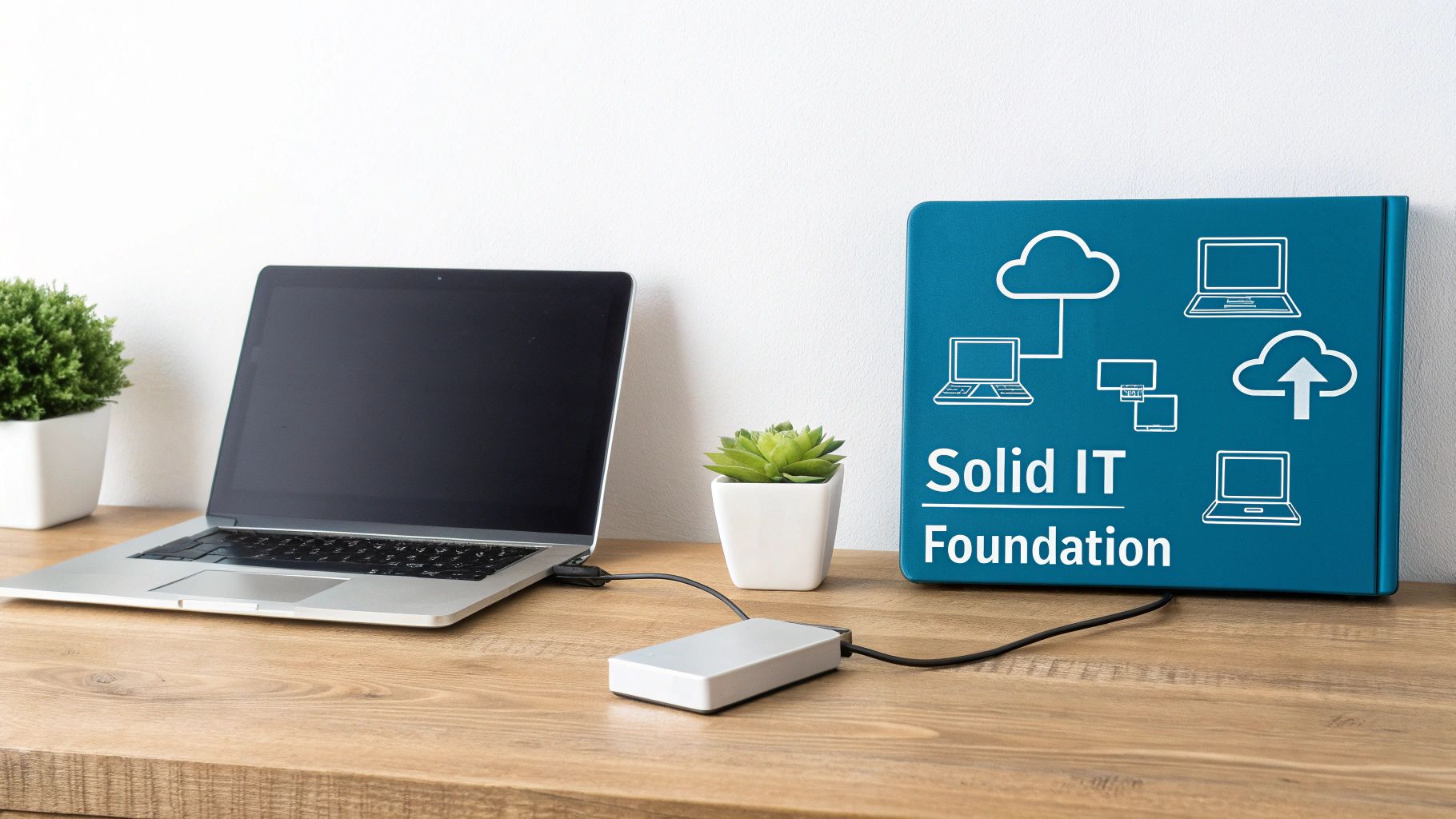
Think of your IT system like the foundation of your house. If it’s weak or cracking, the entire structure is at risk. The exact same principle applies to your business technology. A reactive, ‘fix-it-when-it-breaks’ approach might seem like it’s saving you money in the short term, but it leaves your operations wide open to downtime, data loss, and security breaches that could be crippling.
For any small business in New Zealand, this foundation is built on a few key pillars that must work together to keep things running smoothly and securely. It’s about more than just having the latest computers; it’s about creating a cohesive ecosystem that actually supports your business goals. Whether you’re an accounting firm in Christchurch or a marketing agency in Auckland, getting these basics right is non-negotiable.
The Core Components of Your IT System
A strong IT framework really comes down to four main areas. If you neglect any one of them, you’re creating vulnerabilities or inefficiencies that will eventually hit your bottom line.
- Hardware: This is all the physical gear your business relies on. We’re talking computers, servers, printers, and the networking equipment like routers and switches that connect everything.
- Software: From the operating systems on your laptops to specialised tools like Xero or Adobe Creative Suite, this is what makes your hardware useful.
- Networking: This is the connective tissue of your business. It allows your devices to talk to each other, gives you internet access, and enables secure data sharing.
- Data Management: This covers how you store, access, and—most importantly—protect your critical business information, from client records to financial reports.
A proactive IT strategy isn’t about preventing every single problem. It’s about building a resilient system that can withstand unexpected issues and recover quickly, minimising disruption to your business and your customers.
Moving From Reactive to Proactive
The old-school approach to small business IT often meant waiting for something to fail before acting. A server crashes, a laptop gets stolen, or a critical file is deleted—and only then does the frantic scramble to fix things begin. This reactive model is incredibly inefficient, stressful, and almost always more expensive in the long run.
A modern, proactive strategy flips this on its head by focusing on prevention and planning. It means regularly maintaining equipment, keeping software updated to patch security holes, and putting robust data protection in place from day one.
By adopting this forward-thinking mindset, technology shifts from being a potential headache to a powerful tool that drives your business forward. To see how this can be achieved without hiring a full internal team, you can learn more about how managed cloud IT services can help you build this essential foundation and secure your future.
Building Your Digital Fortress with Key Security Measures
Cyber threats like ransomware and phishing are a constant, nagging risk for businesses all across New Zealand. Building a digital fortress isn’t about finding one magic bullet; it’s about creating layers of defence that work together to protect your most valuable assets. Forget the generic advice—this is a practical look at the essential security measures you can put in place today.
These aren’t just technical checkboxes. They are fundamental practices that safeguard your client data, financial records, and intellectual property. Each layer you add makes it significantly harder for attackers to succeed, turning your business from an easy target into a tough nut to crack.
The First Line of Defence: Passwords and Access
The most common way attackers get in is surprisingly simple: weak or stolen passwords. Enforcing a strong password policy is the single most effective, low-cost security measure you can implement right now. Think of it as the lock on your digital front door.
A strong password isn’t just about length; it’s about complexity. Encourage your team to use passphrases—four or more random words strung together—which are much harder for computers to guess but far easier for people to remember. For example, “CorrectHorseBatteryStaple” is vastly more secure than “P@ssw0rd1!”.
Another critical layer is multi-factor authentication (MFA). Think of MFA as needing two keys to open a door instead of one. Even if a cybercriminal manages to steal a password, they’re stopped dead in their tracks because they don’t have that second piece of the puzzle, which is usually a code sent to your phone. Reports have shown that MFA can block over 99.9% of automated cyberattacks.
Keeping Your Systems Healthy and Updated
Outdated software is like leaving a window wide open for burglars. When software developers release updates, they’re often patching security holes they’ve found. If you delay these updates, you’re knowingly leaving your systems exposed to known exploits.
It’s a simple fix: set all your critical software—operating systems, browsers, and antivirus programs—to update automatically. This one step ensures you’re always protected against the latest known threats without you even having to think about it.
Your digital fortress is only as strong as its weakest point. Regularly updating software and educating your team are not optional extras; they are foundational pillars of modern small business IT security.
Just as important is having a robust network firewall. A firewall acts as a security guard for your internet connection, monitoring all the traffic coming in and out and blocking anything that looks suspicious. Most modern routers have a firewall built-in, but you need to make sure it’s actually switched on and configured correctly to protect your business network.
The Human Element: Your Team as a Security Asset
Technology alone can’t protect you. Many cyberattacks rely on social engineering—tricking and manipulating people into giving up confidential information. Your employees are your last line of defence, and with the right training, they can become your strongest security asset.
Teach your team to spot the common red flags of phishing emails, such as:
- Urgent or threatening language designed to make them panic and act quickly.
- Poor grammar, spelling mistakes, and generic greetings like “Dear Customer.”
- Suspicious links or unexpected attachments, even if they seem to be from someone they know.
A well-defined security policy is crucial for setting clear expectations for everyone. For a great starting point, check out this information security policy template to formalise your procedures and ensure everyone in your organisation understands their responsibilities. Identifying and reducing potential entry points for attackers is a critical security measure; consult a practical guide to attack surface management to better understand your vulnerabilities.
By combining strong technical controls with an educated and aware team, you create a resilient defence against the vast majority of threats facing Kiwi businesses today.
Why Automated Data Backup Is Your Ultimate Safety Net
Imagine walking into your office one morning to find every client file, every invoice, and every crucial business document… gone. A hard drive could fail, or a ransomware attack could lock you out of your own system. For a small business in New Zealand, this isn’t just an inconvenience; it’s a catastrophic event that can halt operations and shatter client trust overnight.
This is where automated data backup stops being a simple IT task and becomes your most important safety net. It’s the single most critical component of a modern small business IT strategy, acting as an insurance policy for your digital livelihood. Without it, you’re gambling with the future of your business every single day.
Local vs. Cloud Backups Explained
Thinking about backups usually brings two options to mind: local and cloud. A local backup is just a copy of your data stored on a physical device you control, like an external hard drive sitting in your office. It’s fast and accessible, but it shares the same physical risks as your main computer—a fire, flood, or theft could wipe out both copies in one go.
A cloud backup, on the other hand, stores your encrypted data on secure servers in a remote datacentre. This is what protects your information from local disasters and hardware failure. A hybrid approach, combining both, offers the best of both worlds—speedy local restores and the robust, offsite protection of the cloud. This is the model we use at our Christchurch-based company, Backup NZ, providing nationwide backup and security using secure datacentres in both Auckland and Christchurch.
This diagram shows how different security measures form layers of protection, with data backup acting as the final, critical safety net.
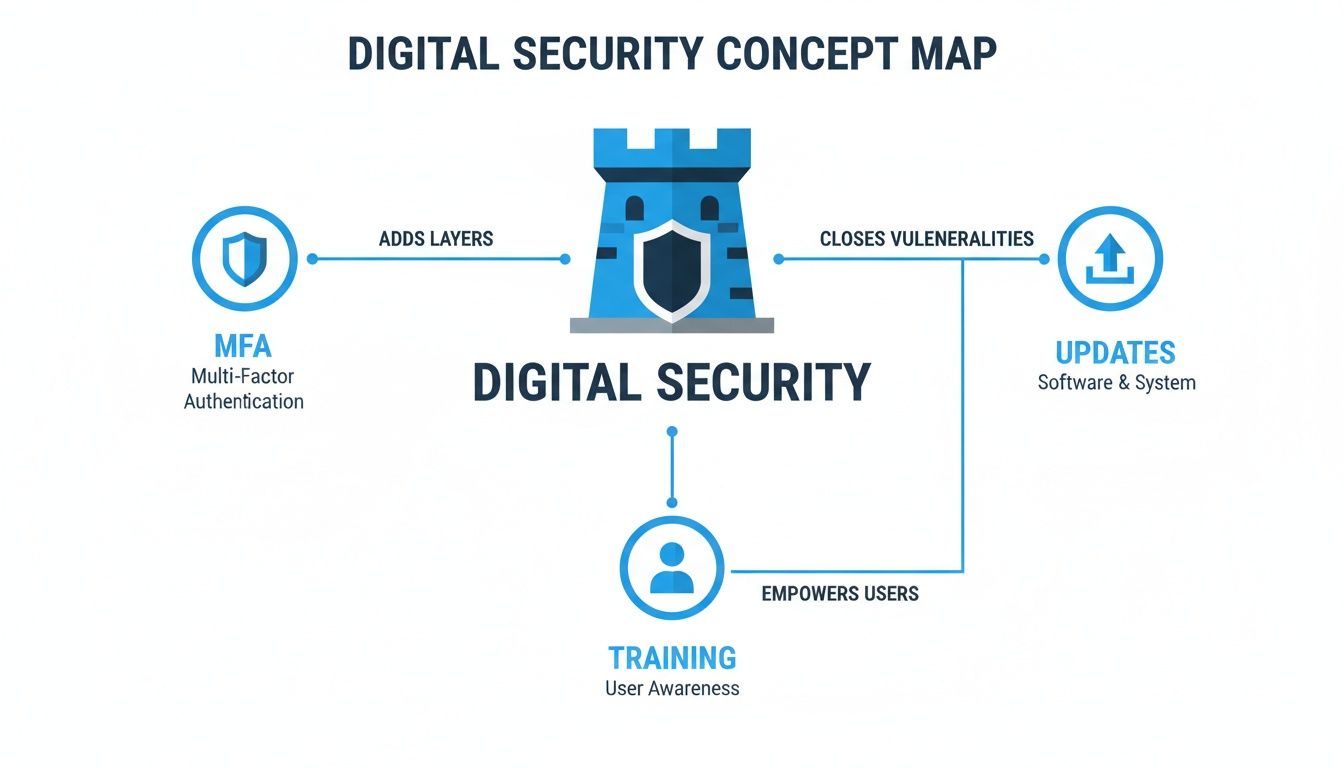
The image highlights a crucial point: while proactive measures like multi-factor authentication and user training are essential, a reliable backup system is your last line of defence when everything else fails.
The 3-2-1 Rule of Backups
The gold standard for protecting your data is a simple but incredibly powerful concept known as the “3-2-1 Rule”. It’s an easy-to-remember framework that ensures your data is safe and recoverable, no matter what happens.
- Three Copies: Keep at least three copies of your data—the original file on your computer and two backups.
- Two Media: Store these copies on at least two different types of media, like an internal hard drive and a cloud backup service.
- One Offsite: Make sure at least one of these copies is stored offsite, far away from your primary business location.
Following this rule drastically reduces your risk of total data loss. If one copy is corrupted or a device fails, you have other versions to fall back on, keeping your business running.
“Forgetting to back up your data is like driving without a seatbelt. You might get away with it for a while, but you’re one unexpected event away from a disaster. Automation removes the human error and makes safety a default setting.”
Must-Have Features in a Backup Solution
Not all backup services are created equal. When you’re choosing a solution for your business, there are a few features that are non-negotiable if you want to be sure your data is truly secure and easy to get back when you need it most.
Look for a service that provides:
- Automated Incremental Backups: The system should automatically back up only the files that have changed since the last backup. This saves time and bandwidth, all without you having to lift a finger.
- AES-256 Bit Encryption: This is military-grade encryption that secures your data before it even leaves your device, ensuring no one can access it without your unique key.
- Rapid Restore Capabilities: In a crisis, you need to get back up and running fast. The service must allow you to restore a single file or an entire system with just a few clicks.
These features transform data protection from a manual chore into a seamless, automated process that works silently in the background, giving you total peace of mind. To see how this works, you can start a no-obligation 14-day trial with us today.
Choosing the Right IT Solutions for Your NZ Business
Trying to make sense of the IT world can feel like a full-time job for any small business owner. You’re constantly bombarded with technical jargon and slick sales pitches, making it tough to figure out what you actually need. But making smart choices here is a cornerstone of your small business IT strategy.
The trick is to step back and create a simple framework for your decisions. It starts with figuring out how you want to manage your tech and what really matters when you’re looking at a critical service like data backup.
Finding Your IT Management Style
For Kiwi businesses, there are really three ways to handle your technology. None is right or wrong; the best fit just depends on your time, budget, and how hands-on you want to be.
- In-House Management: This is the DIY approach. You’re in complete control, but it also means you’re responsible for everything – the updates, the security, the troubleshooting. It takes serious time and technical know-how.
- Managed Service Provider (MSP): Think of this as outsourcing your entire IT department. You partner with an external company for all-around support. It can be a great, comprehensive option, but often comes with a hefty price tag and locks you into long-term contracts.
- Specialised Cloud Services: This is the modern, flexible approach. You pick and choose the best tool for each job. For example, you might use Xero for your accounts, Microsoft 365 for your team’s productivity, and a dedicated Kiwi service like ours for protecting your data.
For most small businesses, that third path hits the sweet spot. You get access to top-tier, reliable tools without the massive overhead or the headache of managing all the complex infrastructure yourself.
Choosing the right IT solution isn’t about finding the most advanced technology; it’s about finding the most reliable and efficient tools that allow you to focus on running your business, not your IT.
How to Select a Backup Solution for Your Business
When it comes to IT decisions, getting your data backup right is one of the most important calls you’ll make. It’s easy to get swayed by marketing fluff, so you need to focus on the features that actually deliver real security and peace of mind.
Here are the non-negotiables to look for:
- Local Presence and Support: Is the provider actually based in New Zealand? When things go wrong, you want to be talking to a local team in your own time zone, not a call centre overseas. A provider like Backup NZ, based in Christchurch with nationwide backup and security, also guarantees your data stays onshore, compliant with NZ privacy laws.
- Security and Encryption: This is a big one. The service absolutely must use end-to-end AES-256 bit encryption. This is the gold standard. It means your data is scrambled on your computer before it even leaves for the cloud, so nobody but you can ever read it.
- Automation and Reliability: Let’s be honest, manual backups get forgotten. A proper professional service should be completely automated. It should just work, humming away quietly in the background and capturing every change without you ever having to think about it.
- Ease of Restoration: A backup is useless if you can’t get your data back quickly in an emergency. You should be able to restore a single file you accidentally deleted or recover your entire system with just a few clicks. The process has to be fast and foolproof.
Use these points as a checklist, and you’ll be able to cut through the noise and find a partner that genuinely has your back.
Affordable and Transparent Pricing
Proper, automated data protection is far more affordable than most business owners think—often costing less than your daily flat white. We believe in straightforward pricing, so here’s a simple breakdown of our plans, designed to fit Kiwi businesses of all shapes and sizes.
Backup NZ Automated Plans for Kiwi Businesses
Here’s a straightforward comparison of our monthly plans, helping you find the perfect fit for your data protection needs.
| Plan Name | Cloud Storage | Monthly Price (NZD ex. GST) | Ideal For |
|---|---|---|---|
| Business 10 | 10 GB | $30 | Sole traders or professionals with essential documents. |
| Business 20 | 20 GB | $50 | Small teams with growing client and project files. |
| Business 50 | 50 GB | $100 | Established businesses with significant data volumes. |
| Business 100 | 100 GB | $150 | Data-intensive firms needing comprehensive protection. |
This clear, upfront pricing means you can budget for world-class data security without any surprises.
Ready to see how it works? You can experience the full benefits for yourself by starting a no-obligation 14-day trial.
The Financial Case for Investing in Smart IT
It’s easy to look at spending on small business IT and automated backups as just another line item on the balance sheet—a necessary evil. But what if you started thinking about it as a strategic move that actually delivers a powerful return?
Too many business owners get stuck seeing their tech budget as a cost centre, a constant drain on resources. This point of view misses the massive financial upside of modernising your digital toolkit. When you get it right, your IT spend becomes a direct driver of growth, efficiency, and ultimately, profitability.
Turning IT Spend into a Productivity Engine
For Kiwi businesses, embracing the right digital tools isn’t just about keeping up with the competition; it’s about unlocking serious economic potential. Small and medium-sized enterprises (SMEs) are the lifeblood of our economy, making up a staggering 97% of all businesses in New Zealand. The opportunity here is huge.
Recent research shows that when these businesses put money into digital tools—things like cloud accounting, cybersecurity, and automated backups—they typically see productivity returns between NZD $2.40 and $3.10 for every single dollar spent. If this happened across the board, it could boost New Zealand’s GDP by an incredible NZD $8.6 billion.
Investing in smart IT isn’t about spending more money. It’s about spending it smarter. The goal is to build a system that saves you time, slashes your risk, and frees you up to focus on what you’re best at—growing your business.
Understanding the Total Cost of Ownership
To really see the financial benefits of smart IT, you have to look beyond the initial price tag. That’s where the concept of Total Cost of Ownership (TCO) comes in. It forces you to consider all the expenses tied to a piece of technology over its entire life, especially the hidden costs that can really bite you.
A cheap, unreliable system might look like a bargain at first, but its TCO is often far higher when you add up the real-world costs:
- Downtime: Every hour your systems are offline is an hour you can’t serve clients or make money. The costs add up fast.
- Data Loss: Think about the cost of recreating lost data from scratch. Worse, imagine the damage to your reputation if you lose irreplaceable client files. It can be catastrophic.
- Manual Maintenance: All that time your team spends troubleshooting IT issues, running manual backups, or just dealing with tech headaches is time they aren’t spending on profitable work.
Reliable, automated systems from a Christchurch-based company like ours are designed to crush these hidden costs. An automated backup service, for example, completely eliminates the hours wasted on manual processes. More importantly, it gives you a rapid recovery path, drastically reducing the financial hit from any potential downtime.
Of course, to truly get the most out of your IT investment, it pays to manage your cloud expenses effectively. Getting your head around FinOps best practices for cloud spend optimization can help you maximise your return.
At the end of the day, smart IT pays for itself. It directly protects your revenue, boosts your team’s productivity, and gives you back your most valuable asset: time. Ready to see the difference for yourself? You can start a completely free, no-obligation 14-day trial today.
How to Start Your Automated Backups Today
Taking that first step to properly secure your business data is much easier than most people think. You don’t need an IT degree or some complicated, multi-page plan to get started. A professional, automated backup solution can be up and running in just a few minutes, giving you instant protection and genuine peace of mind.
The whole process is designed to be fast and painless, letting you set it and forget it. Honestly, it’s the single most important thing you can do today to protect your livelihood from an unexpected disaster.
Your Simple Three-Step Setup
Getting started with a service like Backup NZ is a straightforward, three-step process. We’re based right here in Christchurch, offering nationwide backup and security without any of the technical headaches.
- Download and Install: First, you download a small, secure software application onto your computer or server. Installation is quick and follows the same simple prompts you’re already used to with any other program.
- Select Your Folders: Once it’s installed, you just choose which folders and files you want to protect. This could be anything from client documents and financial records to your entire system.
- Let It Run: And that’s it. Seriously. The software works automatically in the background, completing the first full backup and then capturing any changes on the schedule you’ve set.
Behind the scenes, the software scans your chosen files, compresses them to save space, and applies military-grade AES-256 bit encryption before sending them safely to our dual New Zealand datacentres. If you want to dive deeper into why this is so effective, have a look at our guide to cloud backup for business.
The moment your first backup completes, you’ve fundamentally changed your business’s resilience. You are no longer vulnerable to a single point of failure like hardware theft, a spilled coffee, or a ransomware attack.
Immediate Benefits You Can Actually See
You’ll start seeing tangible benefits from the moment your first backup is complete. You get real-time email notifications confirming every successful backup, so you’re never left wondering if your data is safe. You can also check in on your backup status from anywhere, at any time, through a simple web dashboard or mobile app.
The best part? You can experience all of this for yourself without any commitment. We offer a no-obligation 14-day trial so you can see just how seamless and effective automated backups really are. Start your trial today and get that complete peace of mind you’ve been looking for.
Got Questions About Small Business IT? We’ve Got Answers.
When you’re running a small business in New Zealand, navigating the world of IT can feel a bit like guesswork. There’s so much noise out there, it’s hard to know what’s truly essential. We get it. Here are some straightforward answers to the questions we hear most often from Kiwi business owners just like you.
“Can’t I Just Use a USB Drive for My Backups?”
Look, using a USB drive is definitely better than nothing, but for a professional business, it’s a seriously risky strategy. Think of it like leaving your only spare key under the doormat – sure, it’s convenient, but you wouldn’t call it secure.
Those little drives are so easy to lose, damage, or have stolen, and when they go, your critical data goes with them. Even worse, they’re a prime target for ransomware. If your computer gets infected, that connected USB drive is the first thing the virus will scramble. A proper, automated cloud service takes these risks off the table completely by storing encrypted copies of your data safely offsite.
“Is the Cloud Really Secure Enough for My Sensitive Client Data?”
Absolutely, but with one major condition: you have to choose a high-quality, reputable service. The best solutions use what’s known as end-to-end AES-256 bit encryption. To put that in perspective, it’s the same security standard trusted by banks and governments.
This means your data is scrambled on your device before it even heads to the cloud, and you’re the only one holding the key to unscramble it. For extra peace of mind, our service stores everything in dual datacentres right here in Auckland and Christchurch. This guarantees your data stays in New Zealand, protected under our local privacy laws.
The question isn’t whether the cloud is secure; it’s whether your chosen provider makes security their absolute top priority. Proper encryption and local data storage are non-negotiable for protecting sensitive Kiwi business information.
“How Much Does a Proper Data Backup Actually Cost a Small Business?”
It’s far more affordable than most people think, and it’s a fraction of the cost of trying to recover lost data or dealing with days of downtime. Here at Backup NZ, our plans start from just $30 per month for the Business 10 plan.
For less than what you’d spend on a daily flat white, you get a fully automated, secure, and reliable system protecting your entire business. When you weigh that against the potential financial and reputational nightmare of losing your data, it’s a small but vital insurance policy for your company’s future.
Our other plans are also built to be affordable and to scale as you grow:
- Business 20: $50 per month
- Business 50: $100 per month
- Business 100: $150 per month
“What Happens If I Actually Need to Restore My Data?”
With a quality backup service, getting your data back is quick and straightforward. You’re in complete control, whether you need to restore a single file you accidentally deleted five minutes ago or recover your entire system after a major crash.
Our service lets you securely access your files from any web browser or through the desktop app, restoring what you need in just a few clicks. For bigger or more complex jobs, our Christchurch-based team is on hand to provide remote assistance and make sure you’re back up and running as fast as possible.
Ready to secure your business with a reliable, automated solution built for Kiwis? At Backup NZ, we provide nationwide backup and security to protect what you’ve worked so hard to build.
Experience complete peace of mind today. Start your no-obligation 14-day trial.